

A preorder is an order for a product that isn’t ready to ship yet, placed on the understanding that you’ll deliver it later. Stripe’s guide to preorder sales in Japan describes the same idea: a business accepts orders before the product is released.
For you as a seller, that reverses the usual order of a sale. You collect demand, and sometimes money, before the stock exists. Before the first order comes in, you’ll need to decide how customers pay, which date you’ll promise, and what happens if it slips.
Below, you’ll see how a preorder works from checkout to delivery, how customers pay for one, why stores offer them and when taking one is a bad idea.
- A preorder is a sale made before shipping is possible: the customer orders a product that isn’t available to ship yet, knowing delivery comes later.
- Payment timing is your main design choice: you can charge in full, take a deposit, or collect nothing until the order is ready, and each option changes how much you’d refund if shipping slips.
- Preorders give you early demand information, but you can still end up with excess stock if production starts before reservations open.
- Preorders fit products with a firm launch or restock dateand fit poorly when the supply date is unknown or the wait is long.
- Trust depends on terms customers see before they pay: a delivery estimate, a visible preorder label and a refund policy.
What Is a Preorder?
In ecommerce, a preorder lets a customer buy something that isn’t ready for fulfillment yet, with your promise to fulfill it later. The product can be brand new, still being made, or already on a ship heading to your warehouse.
Shopify’s help center puts it the same way. Customers can purchase or reserve items that aren’t ready for fulfillment yet, and you fulfill them later.
Preorder vs backorder
Preorders get mixed up with backorders, because the two words are easy to confuse. In this guide, a preorder covers a product that hasn’t launched or arrived yet, whereas a backorder covers one you normally sell that has temporarily run out.
Checkout can look much the same for both, since both let customers pay now and wait. With a backorder you’ve sold the product before, so past restocks tell you roughly how long the wait will be. A new preorder, by contrast, may have no such history, which makes the date harder to set.
How Preorders Work
For customers and sellers alike, a preorder follows the same path as any other order, with a gap in the middle. You collect orders while you wait, then ship once the stock is ready.
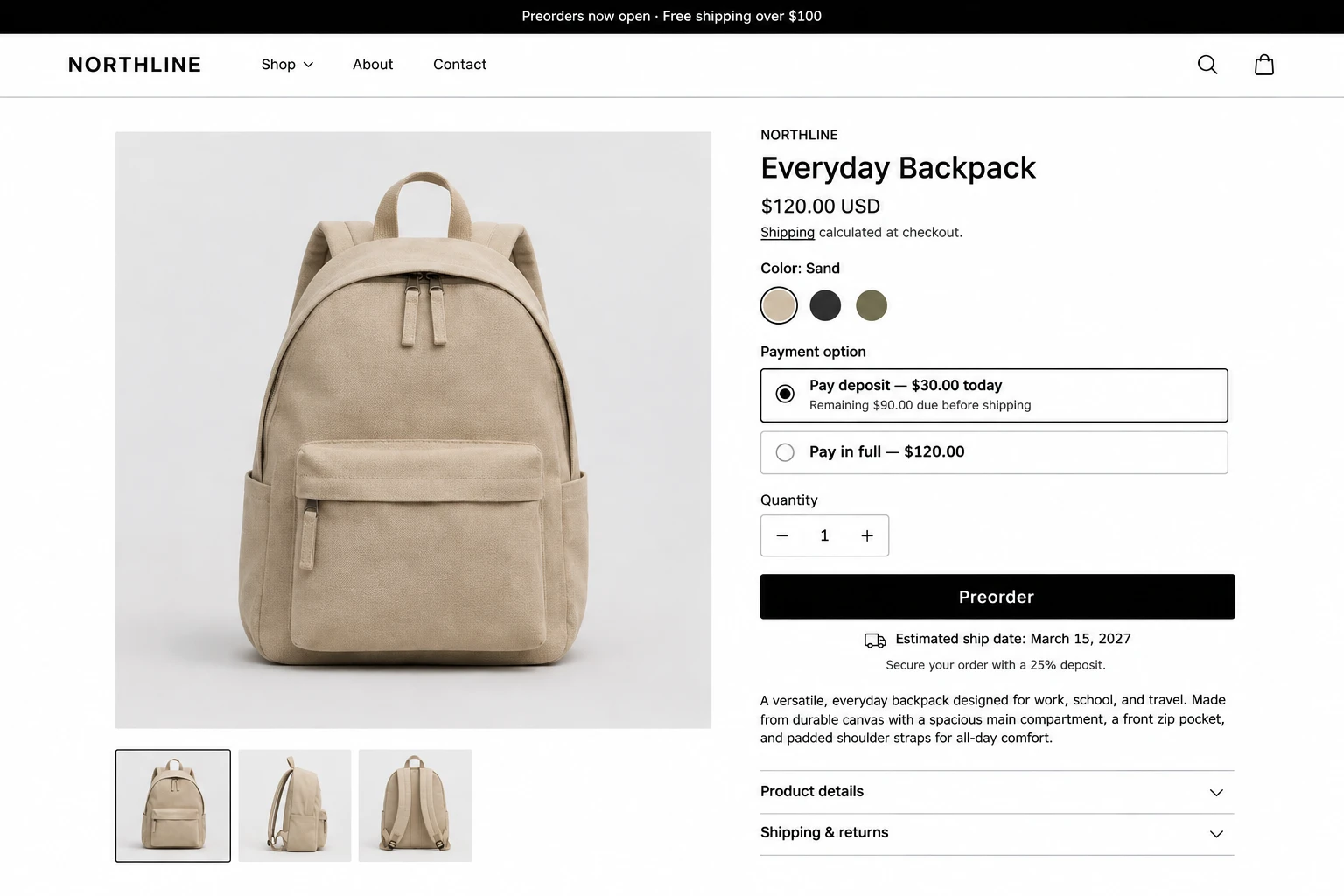
It starts on the product page. You mark the item as available for preorder and state when it’ll ship, because that date is the main thing the customer agrees to. At checkout, they pay in full, pay a deposit or pay nothing yet, depending on how you’ve set it up.
Orders then pile up while you wait for stock. That stretch is where a preorder differs from a normal sale, since you hold orders you can’t fulfill yet. A running count of units promised against units on the way keeps you from selling more than you’ll receive.
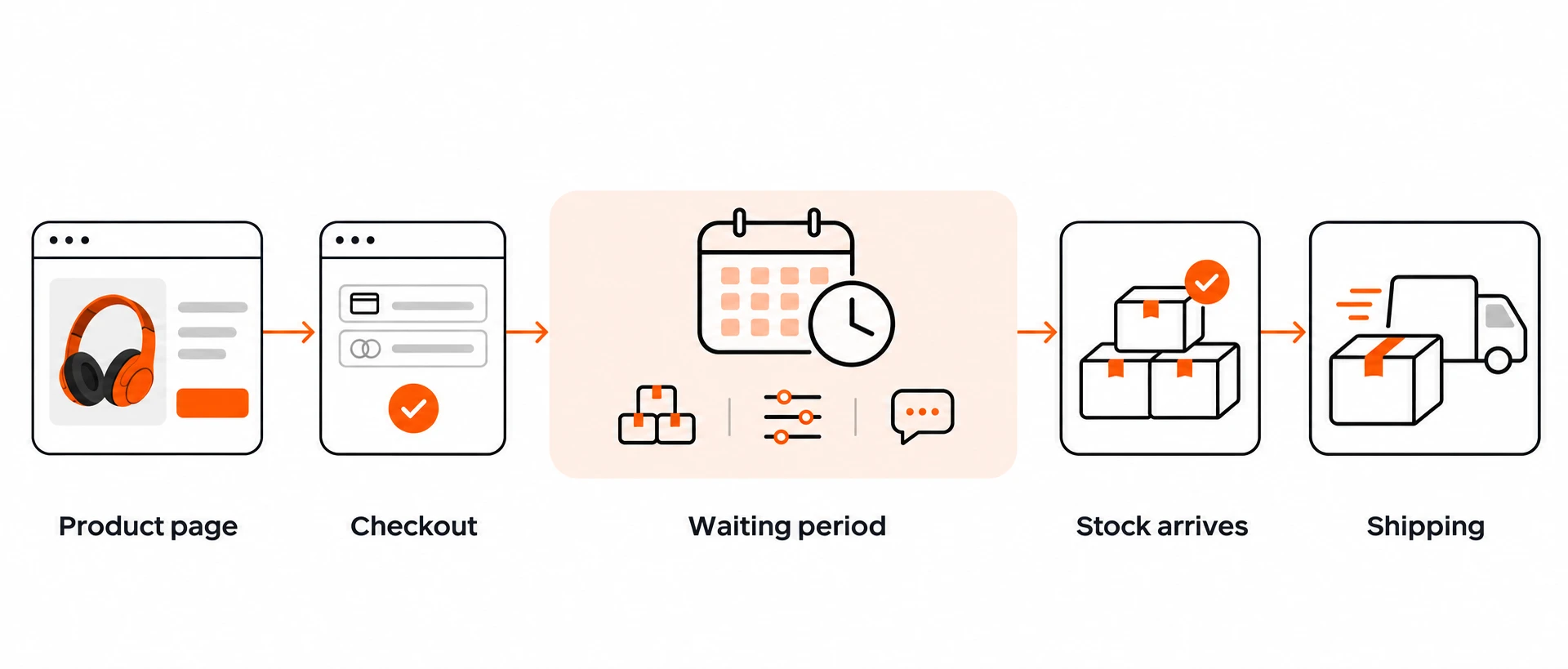
When the stock lands, you fulfill preorders first, charge any remaining balance and send tracking details. If the date has moved, tell customers before they have to ask. The risks section below covers the rules that apply in the US and the EU.
If your store runs on Shopify, our guide to how to set up preorders on Shopify walks through the steps with and without an app.
How Customers Pay for a Preorder
You can charge for a preorder in three ways: the full price at checkout, a deposit now with the rest later, or nothing until the order is ready. Shopify’s help center lists the same range. You can collect full, partial or no payment when the customer places the order, then collect the remainder later.
Which option fits depends mostly on what you’d owe if the ship date slips. If it applies to your setup, the FTC’s business guide says a seller that cancels an order has to refund what the customer paid for the unshipped item. The more you collect up front, the more you’d hand back. Below is our own reading of that trade-off.
| Payment model | Customer pays at checkout | Refund exposure if shipping slips | Fits best |
|---|---|---|---|
| Full payment | The full price | The full price of every delayed order | Short waits with a confirmed date |
| Deposit | A share of the price, with the rest charged later | Only the deposit | Higher-priced products or longer waits |
| Pay later | Nothing until the order is ready | Nothing to refund | Products with a firm date, where you can live with easy cancellation |
Say a $200 jacket has a 30% deposit. The customer pays $60 at checkout and the remaining $140 is charged later. If you cancel the order, the refund is $60 instead of $200. Those are round numbers for illustration.
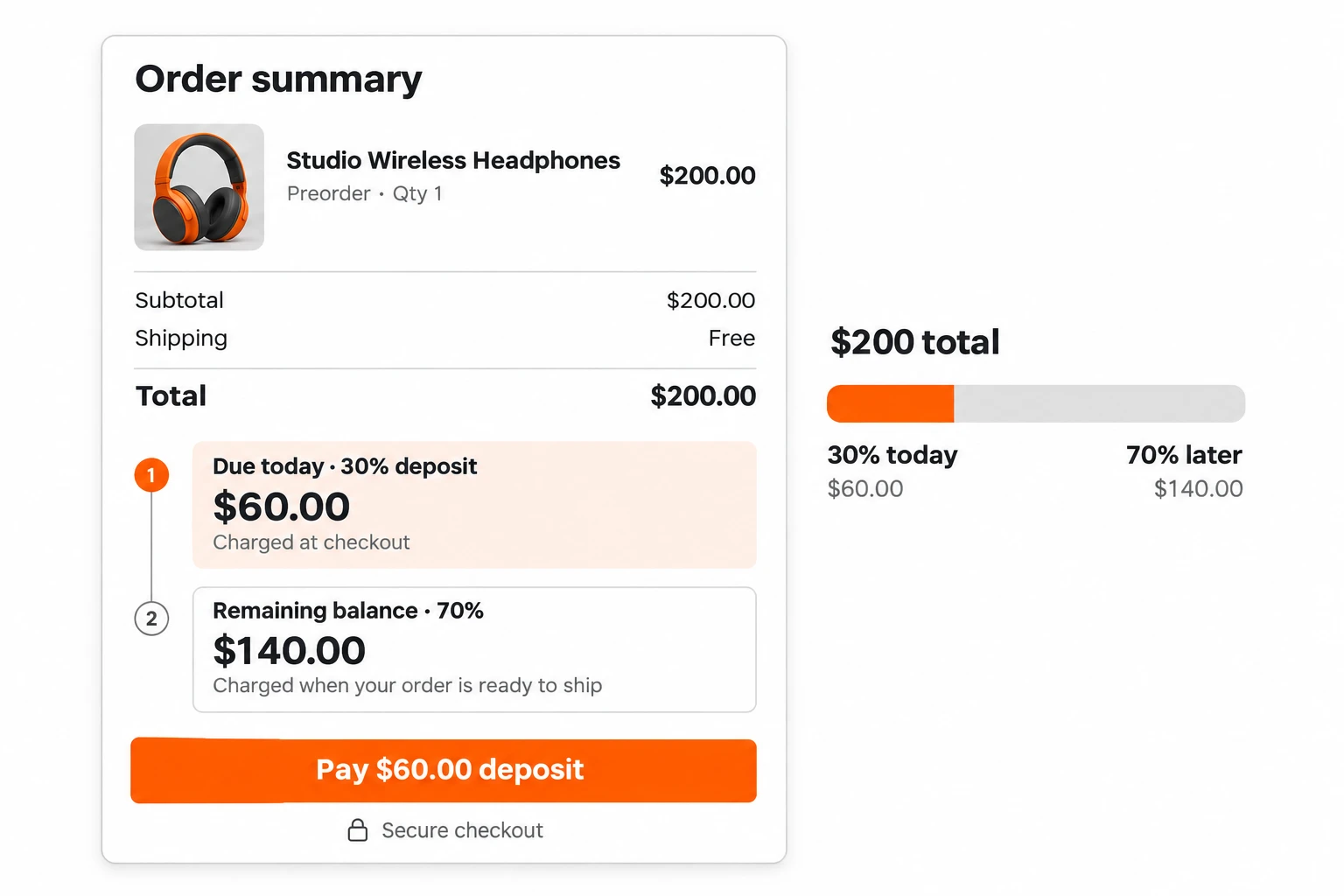
Full payment gives you cash early, which can help pay for production, but every delay then becomes a refund question. A deposit sits in between: the customer is committed enough to hold the product, so you carry less if something goes wrong.
With pay-later, customers risk nothing up front. That makes cancelling easy for them, so a pay-later order tells you less about real demand.
Why Stores Offer Preorders
One reason stores offer preorders is to learn how much demand a product has before they commit to stock. Another is to start selling before the product can ship.
A 2021 modelling study of presale systems by Quan and Cho found that presales can let retailers reduce uncertainty about market demand. The study describes a mathematical model with numerical analysis. That means it supports the logic without proving results for your store.
Stripe makes a similar point about forecasting. Forecasts built on preorder data can help a business avoid producing excess inventory. In practice, treat preorder counts as one input to your stock order instead of a guarantee of demand.
If you take full or partial payment at checkout, that money can also help fund the stock that fulfills the order, a real help for stores that can’t front the cost of a large first batch. Selling during the launch window means customers don’t have to come back once the stock arrives.
When Preorders Make Sense and When They Don’t
Preorders make sense when you can name a ship date you expect to meet. They cause trouble when you can’t.
A product with a confirmed launch date or a supplier shipment already in transit fits well. You can state the date, and customers know what they’re waiting for. Your order count then maps to units that are already on the way.
If the supply date is unknown, a preorder fits poorly, because you’d have no honest estimate to put on the page. If the US rule applies to you, it gives another reason: when a seller states no shipping time, the FTC business guide says it still needs grounds to believe it can ship within 30 days.
If the product is just out of stock and nothing new is launching, a backorder or a back-in-stock alert can be the better route. Our guide to handling out-of-stock products on Shopify explains how to choose between them.
Risks of Preorders for Buyers and Sellers
The main risk of a preorder is a delay, because customers have already paid, fully or in part, for something you haven’t shipped. Cancellations and leftover stock are the other two risks to plan for.
Delays and the rules that apply
What happens when the date slips depends on where you sell. In the US, the FTC’s Mail, Internet, or Telephone Order Merchandise Rule covers most goods a customer orders by mail, phone, fax or on the internet. The FTC’s guide doesn’t use the word preorder, so ask a lawyer how it applies to your setup.
If you state no shipping time, you’re expected to have a reasonable basis for shipping within 30 days. When you can’t ship on time, you must offer the customer a clear choice, made without waiting to be asked: agree to the delay, or cancel for a prompt refund. The regulation (16 CFR 435.2) says you have to make that offer within a reasonable time after you first know you can’t ship, and the FTC guide sets the refund deadlines you’ll want to read before writing your terms.
In the EU, Your Europe, the consumer guide, says a seller should deliver within 30 days unless a different time was agreed. A customer who hasn’t received the goods by then can remind the seller and set an additional reasonable deadline. If the goods still don’t arrive, the customer is entitled to cancel the contract and be reimbursed.
The UK’s guidance for businesses sets the same 30-day default unless you’ve agreed otherwise, although that page doesn’t cover late delivery.
Rules differ by country, so read the sources for your market before you write your terms.
Cancellations and leftover stock
Cancellations rise with the length of the wait. Stripe’s guide puts it plainly: the longer the preorder period, the higher the cancellation rate.
Because cancellations rise as the preorder period gets longer, keep the window as short as your supply allows, and tell customers early when the date moves.
Production typically starts at least partly before a business opens preorder reservations, as the same Stripe guide points out. If demand then comes in below plan, you can still end up with excess inventory.
Customer trust
Telling customers the delivery estimate, labelling the product as a preorder and publishing your refund terms before they pay leaves less to argue about when an order is late. Writing those terms down in one place also saves you from improvising them mid-delay.
Send a delay notice before the date passes, give the new date and offer the choice to cancel, which is the choice the US rule expects you to put in front of the customer.
Further reading Shopify Preorder Policy: How to Set Ship Dates You Can Actually Keep How to word delivery estimates, refunds and delay notices before you take the first preorder.Tools That Handle Preorders
The tool you need depends on the platform your store runs on, but every preorder tool does the same few jobs. It lets customers order a product before it’s in stock, shows the ship date, and takes full or partial payment, as the sections above describe.
For example, if you use Shopify, one of the most popular ecommerce platforms, you need an app to take preorders online. According to Shopify’s help center, pre-orders require installing a pre-order app and are currently available only to merchants using Shopify Payments or PayPal Express. If you need help finding the right one, our roundup of the best Shopify preorder apps compares the main options.
Tech Arms makes TA Preorder & Back In Stock. The app runs preorder, backorder and presale campaigns, with limits per product or variant, and you can take full payment or a partial payment now and the rest later. It also collects a restock waitlist and alerts shoppers when an item is back, and its analytics show which items people are waiting for. It’s free at $0 a month, with no paid tiers.
Further reading How Benson Archery keeps selling $3,000 bows that are out of stock A Sydney archery store takes a 50% deposit on backorders for six flagship bow models.FAQs
Does a pre-order charge you immediately?
It depends on how the store sets it up. On Shopify, a store can collect full, partial or no payment when the customer places the order, and collect the remainder later.
Can pre-orders be refunded?
It depends on the situation. According to the FTC’s business guide, which doesn’t name preorders, a seller that cancels an order must promptly refund the customer’s money, without being asked. Whether a customer can cancel on their own otherwise depends on the store’s preorder policy.
Is a preorder the same as a backorder?
They’re related but different. A preorder covers a product that hasn’t launched or arrived yet, whereas a backorder covers a product the store normally sells that has run out. Checkout looks similar for both, since customers pay now and wait either way.
How long does a preorder take to ship?
As long as the date the store states, which should be one it can meet. If a US seller states no shipping time, the FTC guide expects grounds for shipping within 30 days. In the EU and UK, guidance sets a 30-day default delivery time unless another time was agreed.
Are preorders legal if shipping is delayed?
It depends on your market, but a delay brings obligations. The FTC’s guide, which doesn’t name preorders, says a seller must offer a choice between agreeing to the delay and cancelling for a prompt refund. In the EU, a customer whose goods still haven’t arrived after a reminder and an extra reasonable deadline can cancel the contract and be reimbursed.
Final thoughts
A preorder lets you sell a product before it can ship, so you’ll want to decide how customers pay, which date you can stand behind and what you’ll do if it slips. A good rule is to take preorders when you have a firm launch or restock date, keep the waiting period short and show the delivery estimate and refund terms before checkout. If you can’t name an honest date yet, hold off on the preorder until you can.
Take preorders with full or partial payment and keep a restock waitlist, in one free Shopify app.
Reviewed by Finn Nguyen · Last updated: November 4, 2026


