
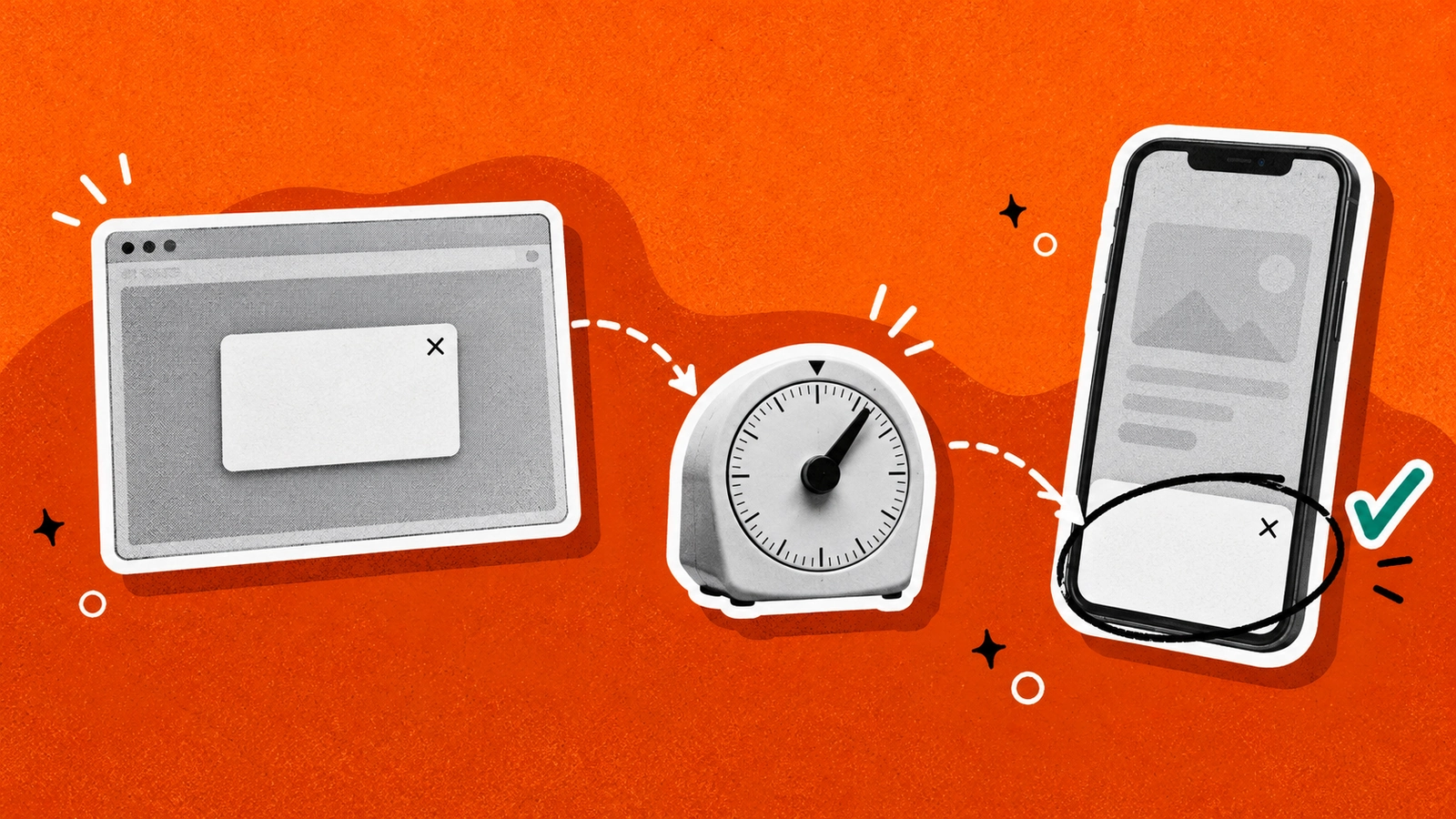
A Shopify popup is a message that opens over a store page after a trigger such as a time delay, a scroll, an exit movement, or a click. Merchants use popups to collect email addresses, announce a discount, confirm a shopper’s age, or promote a sale.
Popups have a reputation problem for good reason. A badly timed one interrupts the shopper, a full-screen version on mobile can run into Google’s guidance on intrusive interstitials, and one that collects emails without clear consent can break privacy law. They work when each popup serves a single goal, appears at the right moment, and is easy to close.
In this guide, you’ll learn which popup types exist, how to add one to your Shopify store, when to trigger it, how to design it for desktop and mobile, which privacy rules apply, how popups affect page speed, how to measure results, and how to choose a popup app.
- A popup interrupts and a banner stays put. Use a popup for the one action you most want, and a banner for ongoing news such as free shipping.
- Shopify Forms is free and covers email popups and inline forms, but its listing does not mention countdown timers, announcement bars, or sales notifications (checked October 2026).
- Google treats full-page overlays as intrusive, while legally required prompts such as age gates are exempt and small banners are the suggested alternative.
- Consent has to be an active opt-in under the UK GDPR, and the FTC lists penalties of up to $53,088 for each email that breaks CAN-SPAM.
- Signups divided by views is the number to track, and app plans count different units, so compare views, pageviews, and contacts before you compare prices.
What is a Shopify popup?
A popup is a window that opens over the page content. In comparison, a banner or announcement bar sits in a fixed spot, usually above the header, and does not ask for anything. Meanwhile, an embedded form sits inside the page layout, for example in the footer, and a slide-in is a smaller popup that enters from a corner of the screen.
A popup interrupts the shopper, so it can earn more actions than a banner but also more annoyance. A banner interrupts less and rarely costs you a visitor. Most stores end up running a banner for ongoing news such as free shipping and a popup for the one action they most want, such as an email signup.
Shopify covers part of this on its own. Many themes include an announcement bar section you can edit in the theme editor, so check yours before installing anything. For popups, the free Shopify Forms app adds pop-up and inline forms that capture leads and apply discounts.
Which popup type fits your goal?
Choose the type by the goal before you look at templates. The table pairs each common format with the job it does, the trigger it usually runs on, and the thing that most often goes wrong.
| Type | Best for | Usual trigger | Watch out for |
|---|---|---|---|
| Email signup | Growing your list, often with a first-order discount | Time on page or scroll depth | Discounting people who would have bought anyway |
| Minimum-purchase or free-shipping offer | Lifting order value at a cart threshold | Add to cart or cart page | Setting a threshold below what your margin allows |
| Exit intent | Recovering a visitor who is about to leave | Cursor leaving the window | Mobile has no cursor, so the trigger differs by device |
| Spin to win or quiz | Gamified signups and preference questions | Time delay or click | The extra step can cost more signups than the game adds |
| Survey | Learning why shoppers hesitate | Exit or after purchase | Long questionnaires that shoppers abandon |
| SMS signup | Collecting phone numbers | Second step after an email signup | Needs its own consent wording |
| Announcement bar | Free shipping thresholds, sale dates, store news | Always visible | Stale messages left up after the offer ends |
| Countdown banner | A sale with a real end date | Always visible until the deadline | A fake or resetting timer that erodes trust |
| Sales or social-proof popup | Showing recent purchases | Rotating during the visit | Notifications for sales that did not happen |
| Age verification | Products with a legal age limit | First page load | It is a legal gate, so never reuse it as a marketing prompt |
| Upsell or cross-sell | Adding products at the cart | Add to cart | Offering items unrelated to what is in the cart |

Discount popups come in a few shapes, and our email popup examples show how stores word them. A percentage off the first order is the common version. A minimum-purchase offer rewards shoppers who reach a cart threshold, so it can lift order value, and a free-shipping offer addresses delivery cost at the moment the shopper sees it. A referral offer rewards existing customers who bring a friend.
Test the size of the discount instead of copying a number from another store. A 10% offer only pays off if the people who claim it would not have bought at full price. Gamified formats such as spin to win suit stores with enough traffic to check whether the extra step costs more signups than it adds.
How to add a popup to Shopify
There are three way you can choose to add a popup on you Shopify store: using the free Shopify Forms app, a third-party popup app, or custom code in your theme.
Option 1. Use Shopify Forms
Shopify Forms is a free Shopify app that creates pop-up and inline forms and can offer a discount to encourage signups. Its listing does not mention countdown timers, announcement bars, or sales notifications, so those need another tool. Start with Shopify Forms when you only need an email popup.
Option 2. Use a popup app
A popup app adds triggers, targeting, scheduling, and formats that Shopify Forms lacks. After you install one, you usually have to enable its app embed: go to Online Store > Themes > Customize, open the App embeds icon, switch the embed on, and save. Until that step is done, the popup never shows on your storefront.
The exact steps differ by app. Our step-by-step guide to adding a pop up on Shopify covers the seven steps from installing an app to activating the campaign.
Option 3. Add custom code
Custom code means writing a snippet and including it in theme.liquid. It gives you full control and puts maintenance on you: a theme update can overwrite the snippet, and consent, frequency caps, and accessibility all become your job. Unless you work with a developer, Shopify Forms or an app is the safer choice.
Five decisions to make in any tool
Pick one goal per popup: either join the list, claim a code, or read an announcement. If you aim for multiple goals per popup, it will split user attention.
Choose the trigger next and write the offer: lead with what the shopper gets, state the amount and the condition, such as 10% off a first order, and ask for one email address.
Then set the rules. Limit the popup to the pages where it fits, cap how often one visitor sees it, and exclude people who already subscribed. Without a cap, the same popup reappears on every page view. Last, open the live store on a phone, trigger the popup yourself, and confirm the close button is visible and the page still scrolls once it closes.
When to trigger a popup
Trigger decides whether a popup feels helpful or intrusive. There are five types of triggers that can cover most merchant needs: time delay, scroll depth, exit intent, a click, and a cart action.
- A time delay shows the popup after a set number of seconds. It is the simplest trigger and the easiest to misuse, because a popup that opens before the shopper has seen a product asks for commitment too early.
- Scroll depth waits until the visitor has read part of the page, which signals interest.
- Exit intent fires when the cursor heads for the browser bar or tab. It targets people already leaving, so a discount here costs less than the same discount offered to everyone on arrival. Mobile has no cursor, so check what your app uses instead before you rely on it. Our exit-intent popup guide covers setup and examples.
- A click trigger opens the popup only when the shopper presses a button, so it never interrupts. It suits a size guide, a quote request, or a signup link in the header.
- Cart triggers fire when the shopper adds a product or opens the cart, which is where upsell offers belong. In TA Banner Slider, Sales Pop up, exit-intent and button-click triggers start on the Advanced plan, and the add-to-cart trigger starts on Platinum.
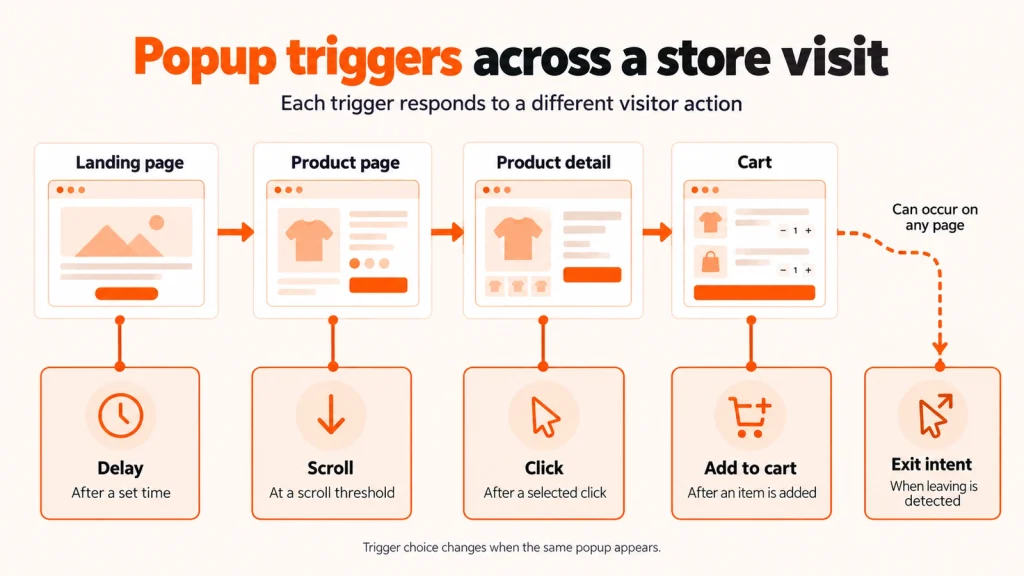
Because no timing rule fits every store, you should treat the first setting as a guess. Then run it for a couple of weeks, and compare signup rates across triggers before you keep one.
Popup design and copy
A good popup has a headline that states the offer, one line of support, a single field, and a button that says what happens next. “Get 10% off your first order” tells the shopper more than “Subscribe”, and “Send my code” beats “Submit”. Ask for the email address and nothing else, because the popup is a first step and you can collect more later.
Give the shopper an obvious way out. A visible close button or a plain “No thanks” link keeps the popup from feeling like a trap. A generous touch target keeps it usable on a phone, and WCAG 2.2 sets 24 by 24 CSS pixels as the minimum target size at level AA.
A popup that opens over the page also has to work without a mouse. WCAG requires every function to be operable from a keyboard and focus never to be trapped, so shoppers should be able to tab to the close button and leave the popup with the keyboard. Text needs a contrast ratio of at least 4.5:1 against its background, which matters most on image-heavy offers.
Match the popup to the store by using the brand’s colors and type, since a stock template looks like an ad. For banner layouts, see our guide to ecommerce banner design best practices.
Further readingPopup Design Best Practices: How to Boost Conversions Without Annoying Your VisitorsA longer treatment of popup layout, copy, and testing.Popups on mobile and Google’s interstitial rule
Google describes intrusive interstitials and dialogs as elements that block the user’s view of content, usually for promotional purposes. Interstitials cover the whole page, dialogs cover part of it, and Google says both can frustrate users and make content harder for search engines to understand.
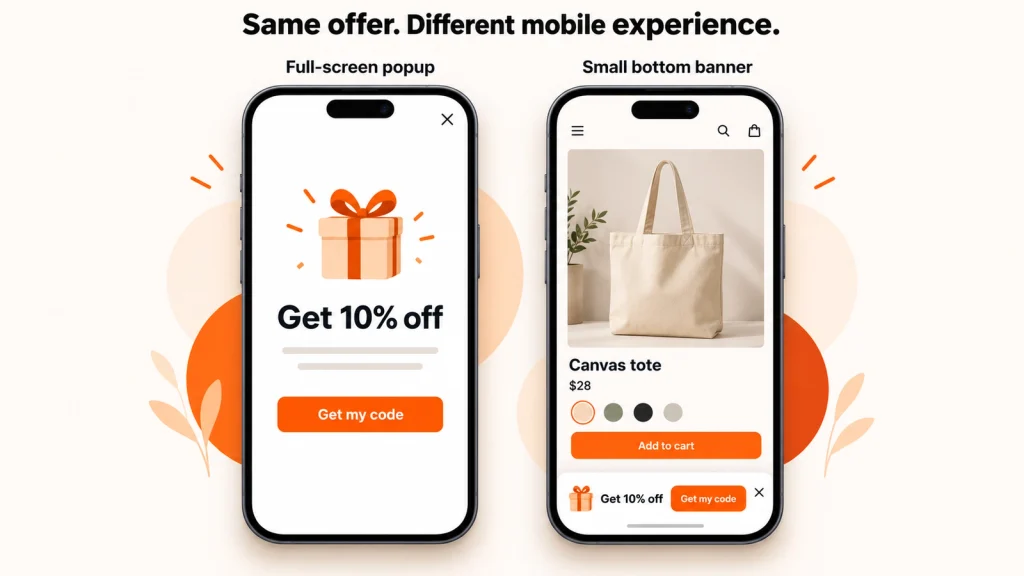
Google recommends banners instead of full-page interstitials and says a banner should take up only a small fraction of the screen. It lists covering the entire page with an overlay as a common mistake. Interstitials a site is legally required to show, such as an age gate, are exempt. For those, Google suggests overlaying the content instead of sending shoppers to a separate page. You can read the full text in Google Search Central.
On a phone, that points to a popup that covers part of the screen with the close button within thumb reach, or a banner at the top or bottom that leaves the product visible. Avoid showing the popup the moment the page loads, since a scroll trigger gives the shopper time to see the product first. Test the form on a real phone, because the on-screen keyboard can cover the field or the submit button.
Seasonal and promotional popups
Popups earn most of their keep around a sale, when a banner announces the offer and a popup captures the shoppers who arrive because of it. A seasonal campaign needs a start date, an end date, and one message per slot. Use an announcement bar for the sale, a popup for the signup, and a countdown only when the end date is real.
Schedule every banner and popup to start and end with the campaign, in your store’s time zone, and replace it the day the offer ends. In TA Banner Slider, Sales Pop up, scheduling starts on the Advanced plan. Black Friday and Cyber Monday compress this work into a few days, so build and test the popups a week ahead, and use our Black Friday ecommerce ideas for the sale itself.
Urgency is honest only when it is real. A countdown tied to a true end date works as a reminder. A timer that resets for each visitor is a fabricated deadline, and shoppers who spot one stop trusting the store’s other offers. Our guide to countdown timer types shows which formats suit which kind of sale.
Upsell and cross-sell popups
An upsell popup offers a higher-priced or upgraded version of what the shopper is considering, and a cross-sell popup suggests a complementary product, such as a case with a phone. On Shopify, both usually run from an add-to-cart or cart-page trigger, because that is the moment the shopper has already chosen something.
Keep the offer relevant to the item in the cart and easy to decline, since an unrelated suggestion interrupts the purchase the popup is meant to grow. A post-purchase upsell appears after payment, which keeps it from delaying checkout. A general popup app can show a simple cart offer, while dedicated upsell apps are built for product matching and checkout placement, and our best upsell apps for Shopify compares them.
Consent and privacy
A signup popup collects personal data, so it needs consent that holds up under the law of the shopper’s country. The UK regulator’s guidance on valid consent lists what counts: an active opt-in, kept separate from other terms, specific about what the shopper agrees to, named to your organisation, and as easy to withdraw as to give. Pre-ticked boxes do not count, and the wording comes from Article 4(11) of the GDPR.
In the US, the FTC’s CAN-SPAM compliance guide says the law covers every commercial email, including promotional email to consumers. Each message needs accurate sender details, a clear advertisement label, a valid postal address, and a working opt-out that you honor within 10 business days. The FTC lists penalties of up to $53,088 for each violating email.
In practice, a popup should name what the shopper is signing up for, link to your privacy policy, and collect a phone number with separate, clearly worded consent when you offer SMS. This section is general information, so if you sell in several countries, have a lawyer review your signup flow.
Popups and page speed
Every popup app loads code on your storefront, so it affects speed. Shopify’s Built for Shopify requirements say an app must not reduce the storefront Lighthouse performance score by more than ten points. That limit applies to apps seeking the badge, so for any app you install, run your own before-and-after test.
Open the same product page in PageSpeed Insights with the app embed on, repeat the test a few times, and compare the performance scores. Then turn the embed off under Online Store > Themes > Customize > App embeds and test again to see how much of any drop comes from the popup. Running one popup app instead of several keeps the number of scripts down.
How to measure and test popups
A popup’s conversion rate is the number of signups or clicks divided by the number of times it was shown. If a popup is viewed 2,000 times and collects 60 emails, its rate is 3%. The figures are illustrative, and your own numbers will differ by traffic source and offer.
Track cost and subscriber quality alongside conversion rate. A 10% first-order discount only pays off if the people who claim it would not have bought at full price, and quality means how many of those subscribers open emails or buy later.
Guides that publish popup conversion lifts disagree widely and many cite no primary source, so treat any benchmark as context and compare your popup against its own previous version instead. Test one variable at a time, such as the headline or the trigger, so the result points to a cause, and run each version until it has collected enough signups to compare.
How to choose a popup app
The comparison below includes apps from several developers, Tech Arms among them, assessed against the same criteria: the free plan, the cheapest paid plan, what each plan counts, and which formats the app covers.
Plans count different things. TA Banner Slider, Sales Pop up counts views, OptiMonk counts pageviews, and Klaviyo and Omnisend price by contacts because popups come bundled with their email platforms. The units differ, so line up what each plan counts before you compare the price.
| Criteria | Shopify Forms | OptiMonk: AI Popup Builder | Klaviyo: Email Marketing & SMS | Omnisend Email Marketing & SMS | Tech ArmsTA Banner Slider, Sales Pop up |
|---|---|---|---|---|---|
| Free plan | Free, no numeric limits listed | 10,000 pageviews a month | 250 active profiles, 500 emails a month | 250 contacts, 500 emails a month | 2,000 views a month |
| Cheapest paid plan | None | $29/mo Essential (20,000 pageviews) | $20/mo Email (251 to 500 contacts) | $16/mo Standard (500 contacts) | $9.99/mo Advanced (100,000 views) |
| Popup formats | Popup and inline forms | Popups | Popups, forms, exit intent | Popups, exit intent, spin to win | Banners, popups, countdowns, sales popups |
| App Store rating | 4.5 (757 reviews) | 4.8 (452 reviews) | 4.7 (3,412 reviews) | 4.7 (3,196 reviews) | 5.0 (1,254 reviews) |
| Launched | November 2022 | October 2015 | September 2012 | March 2014 | September 2024 |
TA Banner Slider, Sales Pop up is our own app, so weigh these notes with that in mind. Its free plan includes every banner and popup type along with a performance report for views and clicks, and the listing carries the Built for Shopify badge. Exit-intent and button-click triggers, scheduling, and targeting start on Advanced at $9.99 a month, and the add-to-cart trigger starts on Platinum at $19.99. Shopify Plus stores pay more for the same tiers, from $29.99 for Advanced. It launched in September 2024, the newest app in this comparison.

Shopify Forms is enough when email capture is the only job. If you already send email through Klaviyo or Omnisend, their built-in popups keep signups and follow-up flows in one place. A dedicated banner and popup app fits when you also need countdowns, sales notifications, or scheduling. Our roundup of Shopify banner apps covers more tools on the banner side.
Common popup mistakes
The five mistakes below are easy to check on your own store.
The shopper has not seen anything worth subscribing for yet, so wait for a scroll or an exit signal.
A signup box, a sale banner, and a chat bubble compete for the same space and leave the shopper closing three things, so run one overlay at a time.
A desktop-sized popup can cover a phone screen with the close button off-screen, which is the situation Google’s interstitial guidance describes.
A countdown that has hit zero or a banner for a sale that ended last week undermines trust in the offers that are still valid.
A pre-ticked box or a missing privacy link falls short of the consent standard described above and can expose you to penalties.
Final thoughts
Pick the one action you most want a visitor to take, choose the quietest format that can get it, and measure signups divided by views before adding a second popup. Shopify Forms handles a simple email popup for free, and an app is worth adding when you need countdowns, scheduling, or sales notifications.
Before you publish any popup, run three checks that cost nothing: open it on a phone, confirm the close button works from the keyboard, and read the consent text as a shopper would.
Frequently asked questions
Does Shopify have a free popup feature?
Yes. Shopify Forms is a free Shopify app that creates pop-up and inline forms and can offer a discount to encourage signups. Its listing does not mention countdown timers, announcement bars, or sales notifications.
What is the difference between a popup and an announcement bar?
A popup opens over the page after a trigger and usually asks the visitor to act. An announcement bar sits in a fixed place, typically above the header, and shares news such as free shipping or a sale date without asking for anything.
Do popups hurt SEO?
Google treats intrusive interstitials, elements that block the view of content for promotional purposes, as a problem and advises against covering the entire page. Small banners are the suggested alternative, and legally required prompts such as age gates are exempt.
When should a popup appear on a Shopify store?
After the shopper has had time to see the page. A scroll trigger or an exit signal usually works better than a popup on page load. Run the first setting for a couple of weeks and compare signup rates.
Is an email popup GDPR compliant?
It can be when consent is an active opt-in, kept separate from other terms, specific about the purpose, and easy to withdraw. Pre-ticked boxes do not count as consent under the UK regulator’s guidance.
Do popup apps slow down my Shopify store?
They add code to your storefront, so they can. Shopify’s Built for Shopify requirements cap the loss at ten Lighthouse points for apps seeking the badge. To check your own store, test a page in PageSpeed Insights with the app embed on and off.


