

A Shopify preorder policy is the set of rules your store follows when you sell something that hasn’t reached your warehouse yet. It covers the date you promise, when you charge, and what happens when that date moves.
In the US, the FTC gives you 30 days to ship unless your product page states another date. It also requires a delay notice once you know you’ll miss it.
In this guide, you’ll learn the shipping rules that apply to your store and how to set a ship date you can hit. You’ll also get the five clauses your policy needs, so the next delay doesn’t cost you the customer.
- The FTC gives you 30 days to ship when your product page states no specific date.
- A first delay of 30 days or less can treat silence as consent. Anything longer needs the customer to say yes.
- EU consumers generally get 14 days to cancel a distance purchase without giving a reason.
- Build your date from the supplier’s confirmed date, with a buffer sized to how late they usually run.
- Show the date on the product page, where customers read it before they pay.
This guide builds on our complete guide to preorders in ecommerce, which covers when preorders are worth running in the first place.
What is a preorder policy?
A preorder policy is a short public page that tells customers what they’re agreeing to when they buy something that hasn’t shipped. It answers four questions: when the item ships, when you charge, what happens if the date moves, and how a customer cancels.
The writing is the easy part. The real work is agreeing, before launch, what your store will do in each of those four cases. Once that’s settled, the page itself takes an afternoon.
Shopify covers some of the mechanics, but not all of them. It’s worth checking that first, since your policy can only promise what your storefront can show.
Shopify supports deferred payment through selling plans, though preorders currently work only with Shopify Payments or PayPal Express. A product can keep selling at zero stock once inventory tracking is on. Shopify’s own preorder setup also requires installing a preorder app.
The preorder shipping rules you need to know
If you sell to US customers, the FTC’s Mail, Internet, or Telephone Order Merchandise Rule applies to every preorder you take. It gives you 30 days to ship, counted from when you receive a completed order.
You can set your own date instead. If your product page says the item ships on March 15, that date governs, as long as you have a reasonable basis for believing you can meet it.
If you miss the date, you owe the customer a notice. What the notice has to say depends on the length of the delay, and that length also decides what a customer’s silence means. For a short first delay, silence means they’ve agreed to wait. For a longer one, it cancels the order outright.
| Your situation | What the FTC rule requires |
|---|---|
| First delay, 30 days or less, firm new date | Silence counts as consent, provided the notice says so |
| Delay beyond 30 days, or no firm date | You need a written, electronic, or verbal yes. Silence cancels the order, and the notice has to say that |
| Second delay, any length | You need an explicit yes again |
| Customer declines, or stays silent where a reply was required | Full refund, promptly, without them asking |
The US rule has one exception. When a customer is applying for credit with you, the shipping window extends to 50 days.
Outside the US, other rules stack on top. EU consumers generally have 14 days to withdraw from a distance purchase without giving a reason, and that right sits alongside whatever your own policy says.
State consumer protection laws can apply as well, so if you sell nationwide, check the rules for the states you ship to. Whichever rule is strictest for a given order is the one to follow.
Further reading How to Set Up Preorders on Shopify (With and Without an App) The setup steps to follow before you write the policy.How to set a ship date you can actually hit
The most common reason a preorder misses its date is that the date was unrealistic from the start and left no room for error. An estimate arrives from the factory, goes onto the product page unchanged, and the first small slip pushes the order late.
Here’s an example. A supplier quotes March 15 for a batch of standing desks, and the store publishes March 15 as the ship date. The supplier then needs a few extra days to finish the batch, and the freight takes a little longer than planned. The store has no buffer to absorb either one. The three steps below turn an estimate into a date that leaves that room.
Step 1. Get the date in writing, then pad it
Ask your supplier for a confirmed ship date instead of an estimate. The two are different commitments, and your supplier knows which one they’re handing you.
Then add time, sized by their record. If the last three shipments each arrived a week or two behind schedule, that gap is your buffer. In the desk example, a supplier who’s run two weeks late three times turns March 15 into a published date of April 1.
Publish a date you’d still meet in a slow week, because customers treat it as a commitment.
Step 2. Put the date on the product page
Customers should read the ship date before they pay, not discover it in a confirmation email afterwards. That means the date has to sit on the product page itself, next to the Pre-order button.
TA Preorder & Back In Stock shows an availability date on the product page, with deposit and partial payment options, for sold-out and presale products. If you use a different app, check that it puts the date where customers look, and that it matches what your policy page says.

“Ships in 3 to 5 weeks” still gives customers something to decide on. It holds up far better than a single date chosen before the supplier confirmed anything.
Step 3. Keep customers informed after they buy
Customers who can see where their order stands have little reason to email you about it. Set your preorder app to notify them when a sold-out variant comes back in stock.
The other half is the shipping confirmation. Make sure it goes out the moment the order leaves, since that’s the point where customers contact support if nothing arrives.
How to handle a delay without losing the customer
Delays come with preorders, and how you handle one decides whether the customer stays. The handling happens in one email, so the sections below cover when to send it, what goes at the top, and how to handle a no.
Confirm the new date before you tell anyone
The pressure to send something fast is real. Hold off for a day anyway, and get a firm date from your supplier first.
A second delay costs more goodwill than the first, and it lands on a customer who has already been patient once. So ask the supplier to put the new date in writing before you quote it.
Put the dates first and the apology second
Customers open a delay email to find out when their order is arriving and what their choices are. Give them the original date, the new date, and what happens if they do nothing, inside the first three lines.
Say your desk supplier slips from March 15 to April 20. The email should open with those two dates, then say what the customer can do: wait, or cancel for a full refund.
The reason comes after the dates. Explaining that a container is three weeks behind is worth doing, once the customer has what they opened the email for.
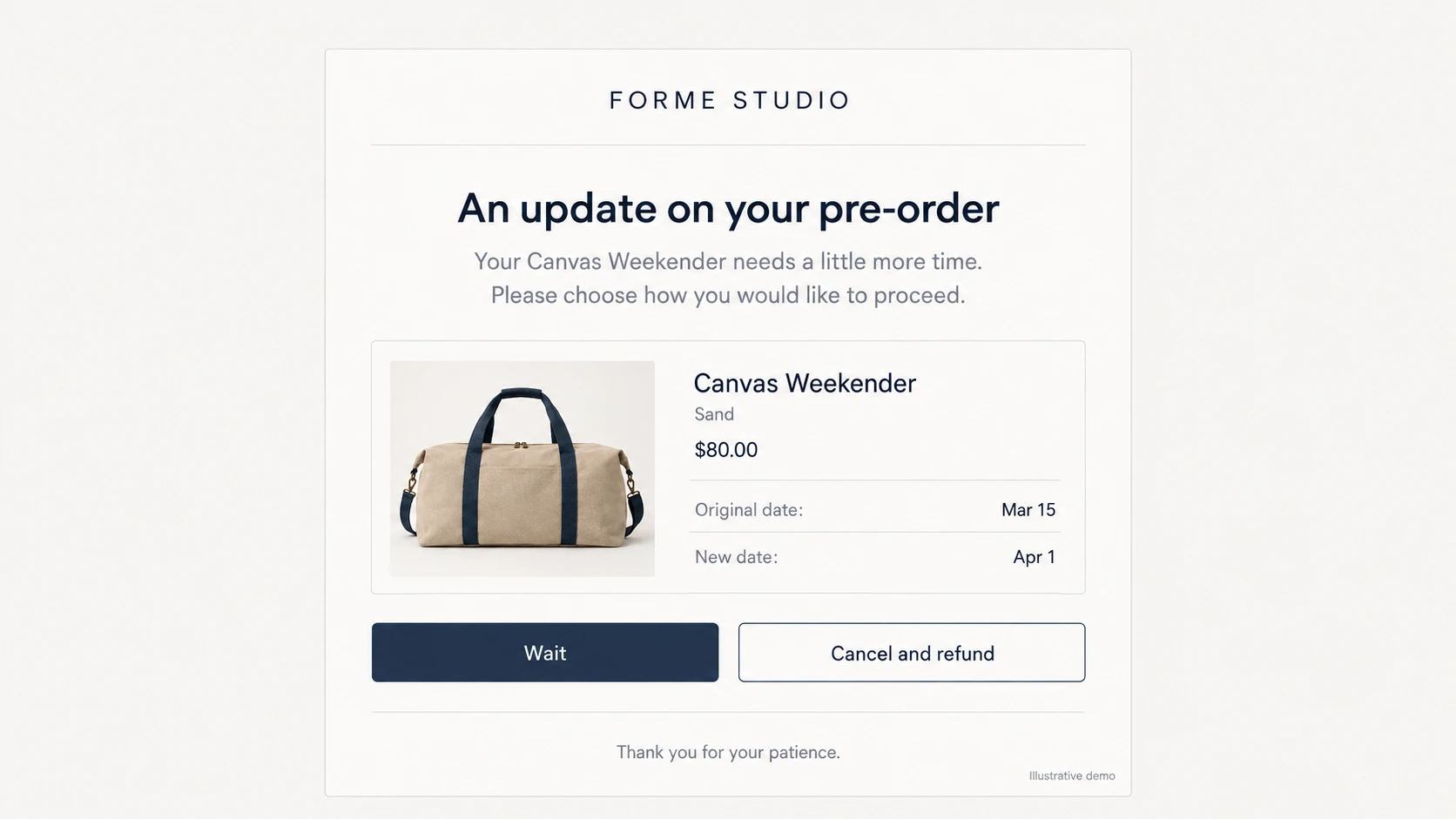
Check which row of the table above applies before you write, because it decides the closing line. A delay past 30 days, or a second delay of any length, means the email has to ask for a reply.
Where silence does count as agreement, say so plainly. Customers should know what their inaction means before it takes effect.
Refund before they have to ask twice
When a customer declines the new date, or stays silent where a reply was required, send the money back without waiting to be asked.
Under the FTC rule, a prompt refund generally means within seven working days for most payment methods. Aim for that window and tell the customer when to expect it.
What to put in your preorder policy
Read through the clauses below, then write each one in your own words so the policy describes what your store does in practice.
Copying another store’s policy tends to promise things your operation can’t deliver. Keep the whole thing on one page, in plain language, and link it from every preorder product.
1. Shipping dates
State that preorder items ship on the date shown on the product page, and that the date can move if your supplier’s schedule moves. The second half of that sentence gives you room later.
Without it, a fixed date has no dependency to fall back on. If the supplier slips from March 15 to April 20, a policy that promised March 15 unconditionally leaves you nothing to point to.
2. Payment terms
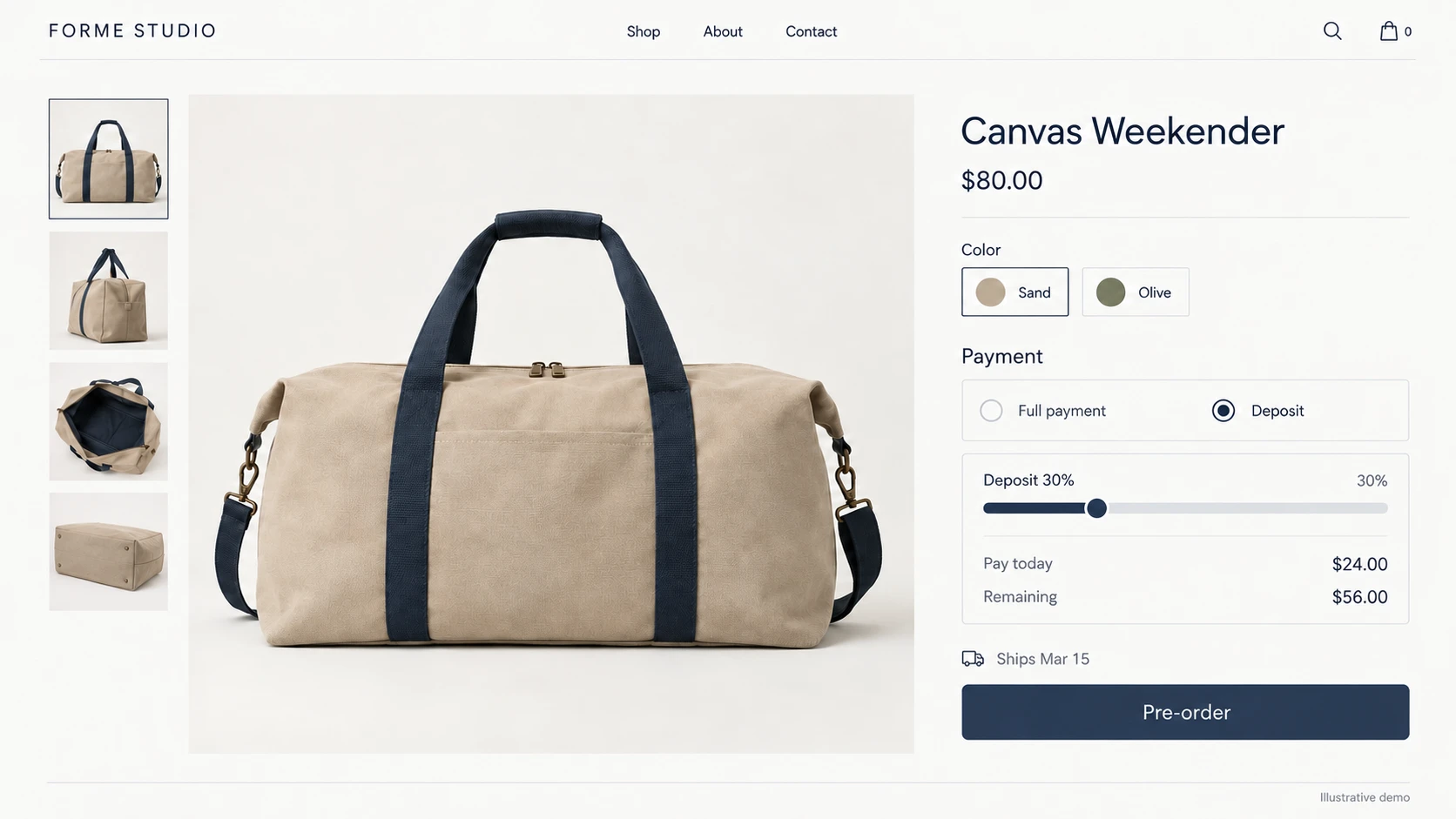
Say whether you charge in full at checkout, or take a deposit now and the balance when the order ships. If you take deposits, name the percentage and the trigger for the second charge.
Deposits lower the barrier on expensive items and long waits, which is why stores use them. They also create two charge events per order. Customers should learn that from your policy, not from their card statement.
3. Delays
This clause carries the legal weight, so write the 30-day threshold directly into it. A delay beyond that point, or a second delay of any length, needs a reply from the customer to keep the order alive.
Fixing the threshold in writing keeps answers consistent when several people handle support months from now.
4. Cancellations and refunds
Let customers cancel for a full refund at any point before the order ships, and say so plainly in the policy.
Give refunds a stated turnaround as well. Counting it in business days, such as “within seven business days”, gives support a number to quote.
5. Force majeure
Add one short clause covering manufacturing and shipping disruptions outside your control. Name the kinds of disruption it covers, such as factory closures or port delays, so the clause stays specific to supply and logistics.
The notice requirements still apply. What changes is how much room you have to move a date during a genuine disruption.
How to test your policy before you launch
Your policy works when the product page, the checkout, and every email tell the customer the same thing. Running a real order through the store is the only way to confirm it.
Place a test order on each preorder product from a separate account, and read every email it generates instead of stopping at the confirmation screen. Look for a ship date that shows on the product page and goes missing, or changes, once the order is placed.
While you’re in there, check three more things. The deposit and the balance charge should both show on the receipt. The restock alert should fire without anyone pressing a button. And your policy page should be linked from the product page as well as the footer.
These checks are worth repeating after a theme update, or after a setting was changed for one campaign and left that way.
Decide, too, who on the team sends the delay notice. A date change that waits two days in a shared inbox can push a 30-day delay into the row below it in the table.
Final thoughts
A preorder policy earns its keep on the day a shipment slips. Build your date from the supplier’s confirmed date plus a buffer, put it where customers read it, and write the five clauses before you need them. Name the 30-day line and the second-delay rule in writing, and the next delay becomes a notice you send, not a decision that costs you the customer.
Can you legally sell preorders on Shopify?
Yes. In the US you follow the FTC’s Mail, Internet, or Telephone Order Merchandise Rule on shipping timelines and delay notices. Other countries, and state consumer protection laws, can add their own rules on top.
How long can a Shopify preorder take to ship?
As long as your product page says, provided you have a reasonable basis for that date. Where the page states no date, the FTC’s default window is 30 days from a completed order.
What happens if a preorder ships late?
You send a delay notice with the new date and the option to cancel for a full refund. Whether silence counts as agreement depends on how long the delay runs, which the table above breaks down.
Do customers have to accept a preorder delay?
No. They can always decline and take a refund. For a first delay of 30 days or less, silence can count as acceptance, while a longer delay or a second delay needs an explicit yes.
Should I take full payment or a deposit on preorders?
Full payment suits short waits and lower prices. A deposit works better on expensive items or waits longer than a few weeks, where customers hesitate to pay everything upfront for something months away.
Preorder buttons, deposits, and automatic restock alerts in one free Shopify app.
Reviewed by Finn Nguyen · Last updated: October 30, 2026


