
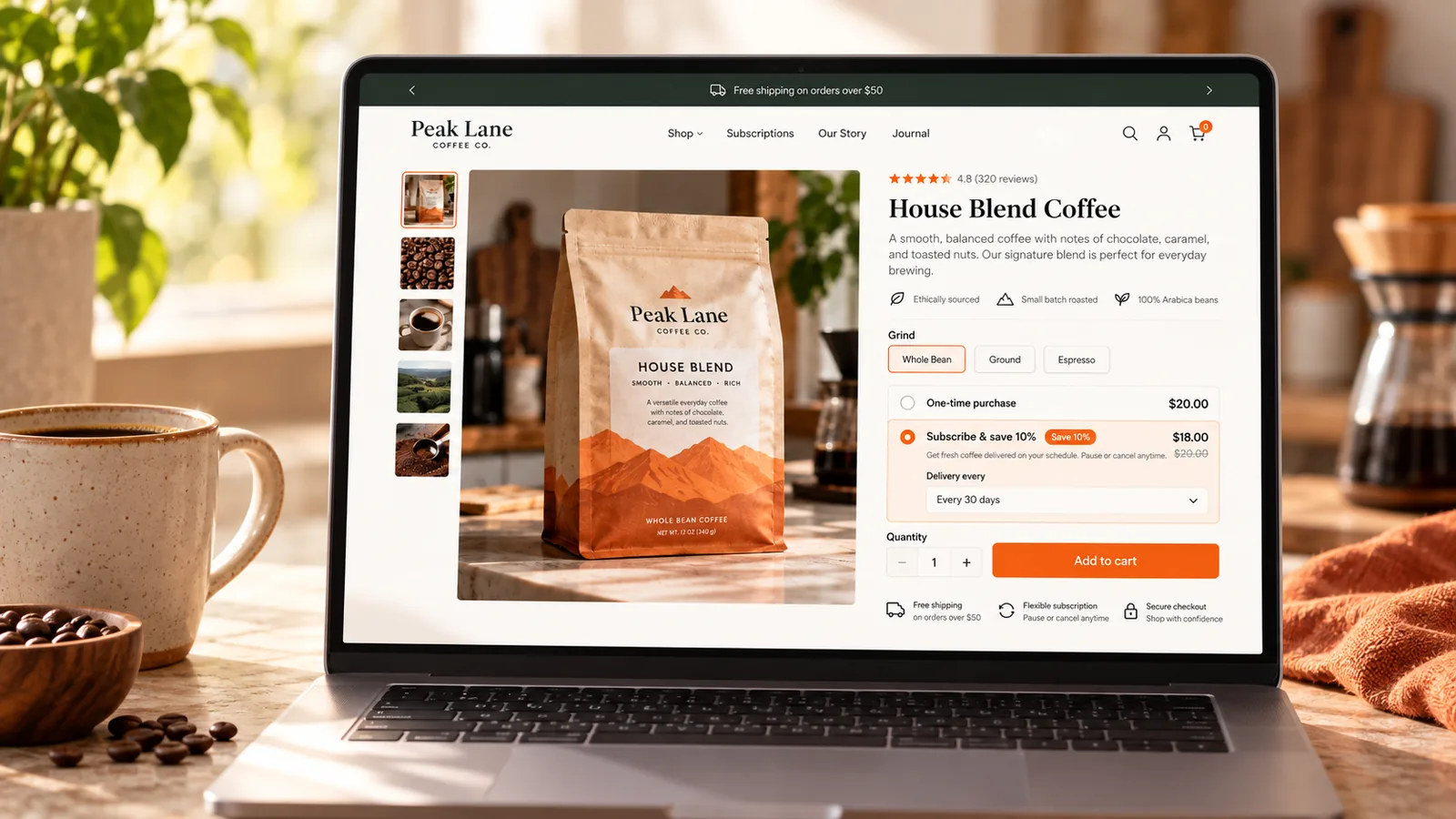
A Shopify subscription charges a customer on a repeating schedule instead of once. You set the interval, weekly, monthly, or any cycle your product fits, and the platform rebills the saved payment method automatically until the customer cancels.
The idea sounds straightforward, but the model you pick decides how fast it grows, and the setup decides how much of that revenue you keep. A subscribe and save plan behaves nothing like a curated box, and a customer portal that frustrates shoppers will cost you more in cancellations than any discount can make back.
In this guide, you’ll learn how Shopify subscriptions work under the hood, which model fits your product, how to set one up, and the mistakes that turn a promising subscription program into a churn problem by month three.
- A Shopify subscription repeats a charge on a schedule instead of billing once, using a saved payment method and a selling plan attached to the product.
- Four subscription models exist (subscribe and save, curated box, replenishment, and access), and the model with the lowest reported churn only fits consumable products.
- Shopify’s free native app handles billing, discounts, and self-service cancel, skip, or pause, but leaves payment retry thin, which is why many stores add a third-party app.
- Execution breaks most subscription programs, a confusing portal or an unhandled failed payment, more often than the choice of model does.
What is a Shopify subscription?
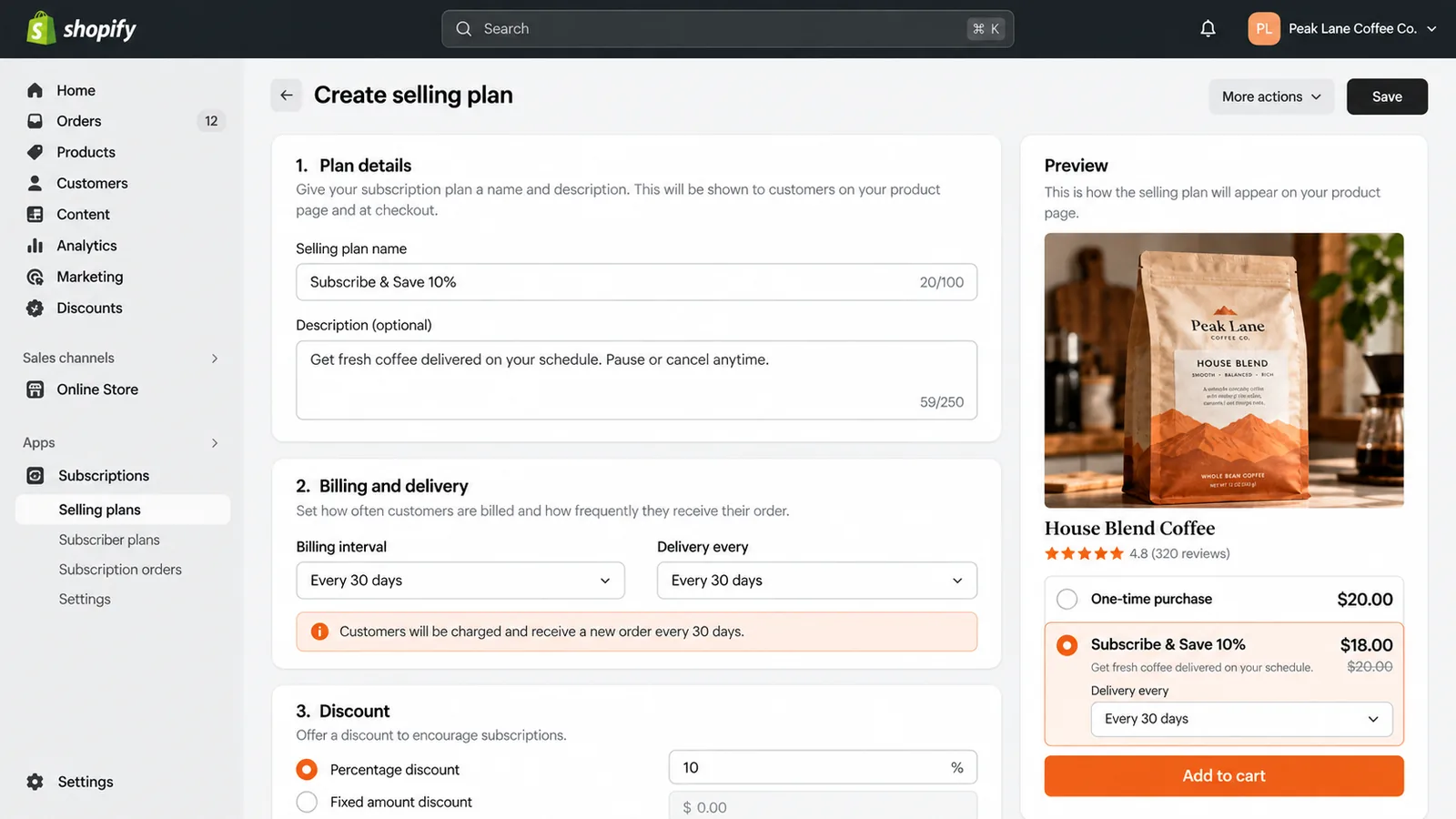
A subscription on Shopify runs on a selling plan, a set of rules attached to a product that tells Shopify how often to bill, what discount to apply, and how long the commitment lasts. When a customer subscribes, Shopify saves their payment method and creates a subscription contract. That contract fires automatically on each billing date until the customer cancels, skips, or the merchant ends it.
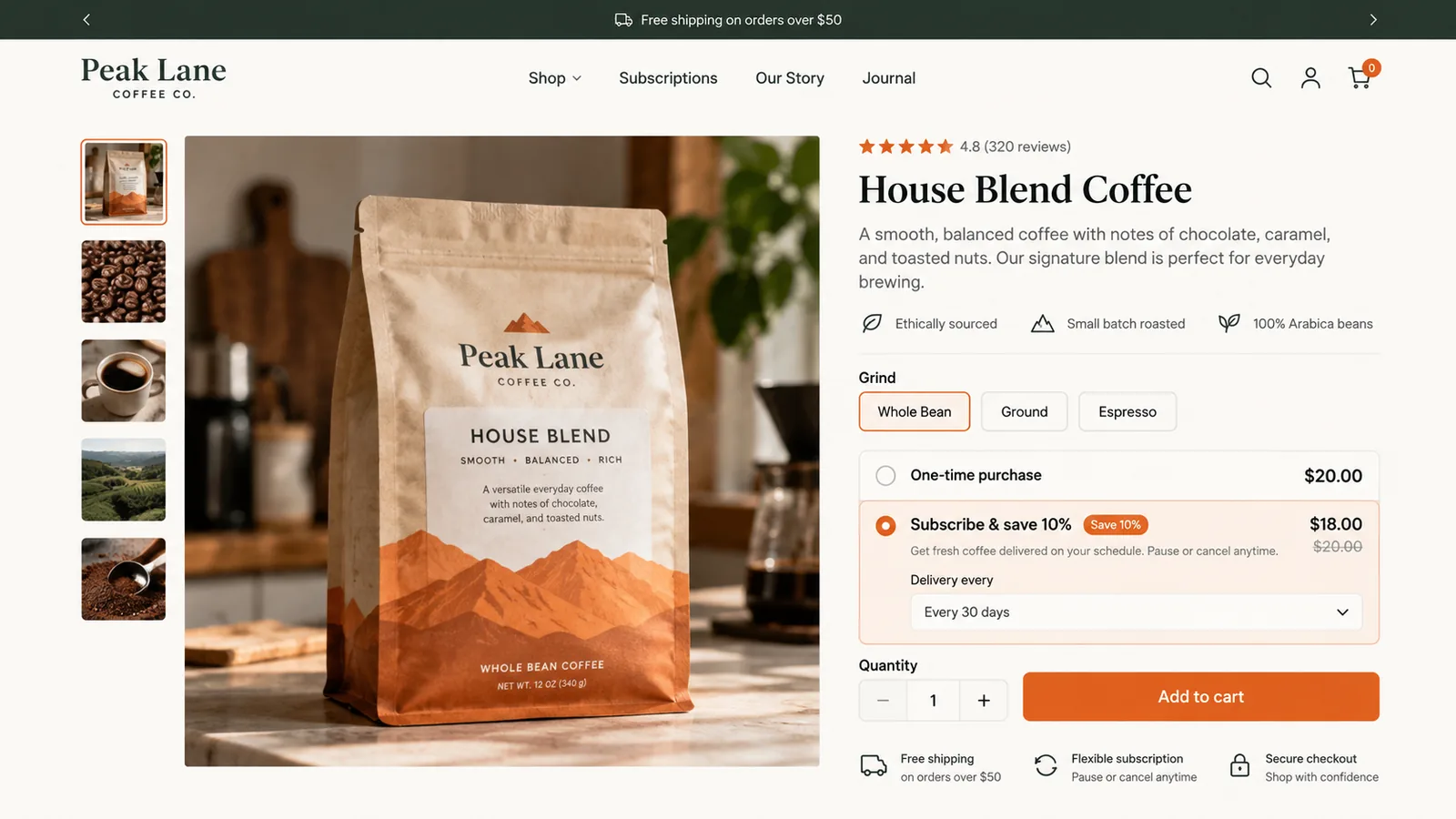
Take a coffee brand selling a $20 bag on a 30-day cycle with a 10% subscribe and save discount. The first charge is $18 the moment the customer subscribes. Every 30 days after that, Shopify rebills the same $18 to the saved card and creates a new order, with no manual input from the merchant unless something fails.
At checkout, the selling plan shows up as a purchase option next to the one-time price, usually with the discount spelled out so the shopper can compare both in one glance. Once they choose the subscription option and pay, Shopify treats every future charge the same way it treats the first one: a new order, inventory deducted, a confirmation email sent, all without the merchant touching the order manually.
What a subscription isn’t
A subscription is not the same as a membership, even though both bill repeatedly. A membership charges for access, to a community, a discount tier, or a service, and it does not have to ship a product on a schedule. A subscription bills for a recurring shipment of goods. The two models solve different problems, and mixing them in your messaging confuses the shopper you’re trying to retain.
Further reading Membership vs Subscription for Ecommerce Which model fits your store, and how to tell the two apart before you launch either one.The subscription models you can run
Subscription models aren’t interchangeable. Picking the wrong one for your product undermines the plan before you launch, and the table below covers the four patterns worth knowing on Shopify.
| Model | Best for | Typical monthly churn |
|---|---|---|
| Replenishment | Consumables people run out of on a predictable cycle: coffee, supplements, pet food | 5–8% |
| Subscribe and save | Products shoppers would buy repeatedly anyway, offered at a discount for commitment | 7–10% |
| Curated box | Discovery or variety as the product itself, not a single item sold repeatedly | 10–15% |
| Access / hybrid | Ongoing perks or content bundled with occasional physical shipments | 3–6% |
Treat those churn figures as directional. They come from subscription-app vendors reporting on their own merchant base, not from an independent audit, so use them to rank models against each other rather than as a number you should hit.
A store can also run more than one model at once. A coffee roaster might sell straight replenishment on whole-bean bags while offering a curated box of single-origin samples as a separate, higher-churn product line. The two don’t have to share a discount structure or a billing interval, since they’re solving different problems for different customers.
Why subscriptions matter for your store
A subscription turns a one-time sale into a stream of future revenue you can forecast, which changes how you plan inventory and cash flow. Instead of guessing whether last month’s customers will buy again, you already know how many are scheduled to rebill next month and roughly how much that is worth.
That predictability comes at a cost. Subscriptions need ongoing support, a portal customers can use without emailing you, and a process for failed payments. All of that takes more operational effort than a one-time checkout. The payoff shows up in customer lifetime value: a subscriber who stays active for eight cycles is worth roughly eight times a single order, discount included, which is why even a modest subscriber base can outweigh the extra support work.
The same math changes how much you can afford to spend acquiring a customer. A one-time buyer only has to cover their own acquisition cost to be profitable. A subscriber who sticks around for several cycles lets you spend more up front on the ad or discount that won that customer, since the lifetime value absorbs a higher acquisition cost than a single sale ever could. This is the main reason subscription brands often bid more aggressively on paid acquisition than stores selling one-time products at a similar price point.
How to measure subscription performance
A subscription program’s health comes down to three numbers: churn rate, monthly recurring revenue, and customer lifetime value.
Churn rate is the share of active subscribers who cancel in a given period: cancellations during the month divided by active subscribers at the start of the month. If you start April with 200 active subscribers and 14 cancel, your monthly churn is 7%.
Monthly recurring revenue is the total you can expect next cycle, found by summing every active subscription’s billing amount, normalized to a month. A mix of 150 subscribers paying $18 monthly and 50 paying $45 quarterly, or $15 a month each, gives you $2,700 plus $750, for $3,450 in MRR.
Lifetime value, in its simplest form, divides average revenue per subscriber by your churn rate. At $18 per cycle and 7% monthly churn, LTV comes out to roughly $257, or $18 divided by 0.07. None of these numbers mean much without a point of comparison, so track them monthly from the day you launch and watch the trend instead of chasing a target you found in a vendor blog post.
How to set up subscriptions on Shopify
Shopify gives you two starting points: the free Shopify Subscriptions app, built and maintained by Shopify, or a third-party app from the App Store. Start with the native option and only add an app once you hit a limit it cannot cover.
Shopify Subscriptions sends payment reminder emails and lets customers update a failed card themselves, but its App Store listing does not describe an automatic retry schedule. Stores with meaningful failed-payment volume typically add a third-party app for that.
Regardless of which app runs it, a handful of setup decisions shape how well the subscription performs.
Billing interval comes first. Match it to how fast the customer uses the product rather than to what looks clean on a pricing page. A 30-day interval on a product that lasts 45 days trains customers to skip every other shipment, which shows up in your reports as churn even though the customer never meant to leave.
The discount tier comes next. Subscription pricing guides commonly point to a range of 10% to 15% off the one-time price, deep enough to earn the commitment and shallow enough to protect margin. Stacking a steeper discount on top rarely moves conversion enough to make up the difference.
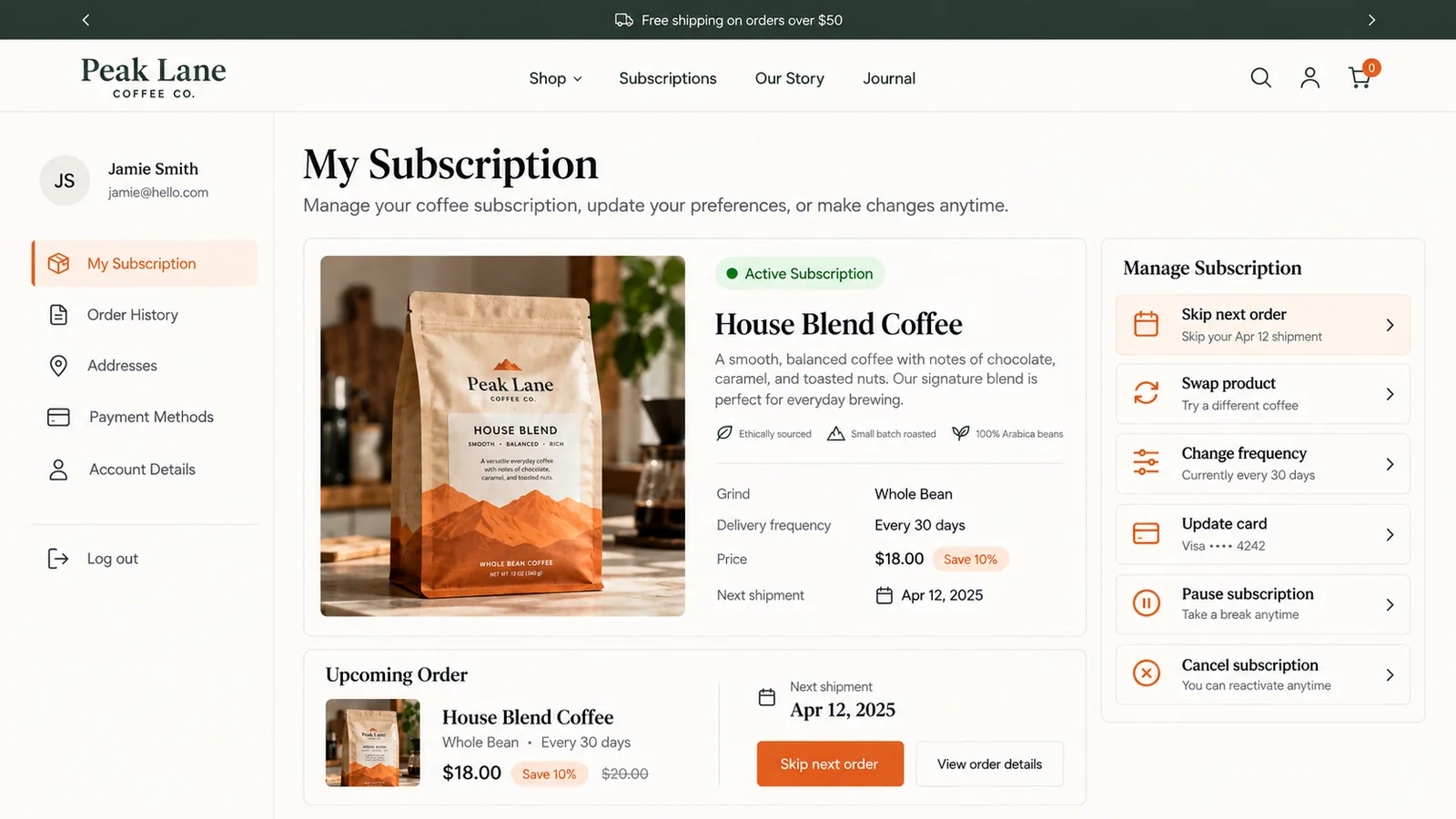
The customer portal is where most of the ongoing friction lives. Shoppers need to skip a cycle, swap a product, or update a card without contacting support, and a portal that buries those actions behind multiple clicks shows up later as a cancellation.
Payment retry logic catches the charges that fail the first time, a declined card or insufficient funds, and retries on a schedule before giving up and notifying the customer. This single feature often separates a native setup from an app-based one, since cutting involuntary churn by even a few points compounds across every cycle. TA Subscriptions builds automated dunning into its retention tools, alongside the subscribe and save and prepaid plan types most replenishment stores need.
Subscriptions also work outside the online store. Shopify supports selling subscriptions through Shopify POS, so a customer standing at the counter can start the same recurring plan a web shopper would see online, with one saved card covering both channels.
Shopify removes a third-party app’s subscription data, apart from contracts and payment information, 48 hours after uninstall unless the app has its own backup. Export your subscriber list and settings before you switch apps, not after.
Common subscription mistakes
The subscriber loss most stores see in the first year traces back to the same handful of mistakes.
A 3% discount rarely changes a shopper’s decision. If the subscribe and save price barely beats buying once, most shoppers buy once and keep their flexibility.
Every skip, swap, or cancellation request that lands in your support inbox instead of a portal costs you time. Shoppers who cannot find a way to pause often cancel outright instead.
A card that fails silently removes a subscriber from your revenue without a deliberate cancellation. Multiple subscription-app vendors report that this involuntary churn makes up a meaningful share of total churn on stores without a retry schedule, though the exact share varies by source.
Three tiers that each shave a slightly different discount off the same product add decision friction without adding real choice. One clear subscribe and save price, next to a one-time option, usually converts better.
Shopify deletes most of a subscription app’s data within 48 hours of uninstall. Stores that switch apps mid-migration and skip the export step lose the billing history and preferences they need to rebuild subscriber trust on the new platform.
How to choose a subscription app
The comparison below includes apps from several developers, Tech Arms among them, assessed against the same criteria: cost at a realistic order volume, payment retry, and portal depth.
Shopify’s native app, Appstle, and TA Subscriptions represent three different trade-offs: free with thinner retry logic, a mature app with revenue-based pricing tiers, and a smaller app with a flatter free plan. Here is how they compare on the criteria that matter most once you’re past your first few subscribers.
| Criteria | Shopify Subscriptions | Appstle | RecommendedTA Subscriptions |
|---|---|---|---|
| Price | Free | Free up to $500/mo in subscription revenue, then $10–$30/mo | Free, no published paid tier |
| Payment retry (dunning) | Not described on listing | Yes, free plan included | Yes |
| Build-a-box / bundling | No | Starts on the $30/mo Business plan | Yes |
| App Store rating | 3.7 (864 reviews) | 5.0 (9,047 reviews) | 5.0 (43 reviews) |
Checked October 2026 on each app’s Shopify App Store listing.
TA Subscriptions holds a perfect 5.0, but on a sample of 43 reviews, the smallest of the three and not yet enough to judge how it holds up at higher volume. Appstle’s 9,047 reviews make it the most tested option here, at the cost of a pricing ladder that adds a monthly fee once subscription revenue passes $500. The native app avoids any app fee, but its listing does not describe the retry logic that cuts involuntary churn, so stores with a meaningful failed-payment rate usually outgrow it first.
Run the numbers at your own volume before deciding. A store processing $3,000 a month in subscription revenue pays nothing extra on Shopify Subscriptions or TA Subscriptions as listed, and lands on Appstle’s $30 Business plan once build-a-box and widget customization are needed, since the free and Starter tiers stop at $500 and $5,000 a month. That $30 is 1% of subscription revenue at this volume, a cost worth paying if the feature set closes a gap the smaller apps can’t, and a cost worth questioning if it doesn’t.
Examples
Vital Proteins runs a subscribe and save program on its collagen products, with a discount on every recurring order and an easy way for customers to change how often shipments arrive, according to Recharge’s customer examples. Pooch & Mutt, a UK pet food brand, pairs a similar subscribe and save discount with a self-service portal customers use to adjust their dog’s order without contacting support.
Both examples point to the same two underlying facts: a discount alone is not enough, and a shopper who can change the order from a portal is far less likely to cancel outright. If curated variety is closer to what you’re building than straight replenishment, our guide to building a subscription box business walks through that model specifically.
The access model looks different from either one. A brand running a paid loyalty tier might bundle a small physical item into the membership instead of selling a standalone product on a schedule, closer to what our membership versus subscription comparison describes as a membership with a subscription-like shipment attached. The billing mechanics on Shopify are the same selling plan either way. What changes is what the customer believes they are paying for: access, or a product.
Final thoughts
Subscriptions reward stores that treat the portal and the failed-payment flow as seriously as the pricing page. Get the model right for your product, keep the setup simple enough for customers to self-serve, and check your churn number monthly from the first cycle onward.
Does Shopify have a built-in subscription feature?
Yes. Shopify Subscriptions is a free app built by Shopify that handles billing, discounts, and customer self-service for cancel, skip, and pause. It has no published payment retry logic, which is the main reason stores add a third-party app.
How much does a Shopify subscription app cost?
Many apps, including TA Subscriptions and Shopify’s own app, offer a free plan. Appstle’s free plan caps at $500 a month in subscription revenue before its $10 Starter plan applies, so cost usually scales with subscription revenue rather than a flat fee.
Can customers skip or pause a subscription on Shopify?
Yes, through the customer portal that ships with Shopify Subscriptions or with any third-party subscription app. The option has to be turned on and placed somewhere customers can find it without contacting support.
What’s the difference between a subscription and a membership?
A subscription bills for a recurring shipment of a physical or digital product. A membership bills for ongoing access, to a discount tier, a community, or a service, without necessarily shipping anything on a schedule.
How do I reduce subscription churn?
Start with involuntary churn: set up payment retry so a declined card gets a second and third attempt before the subscriber is lost. Then look at the portal, since friction in skipping or swapping an order often shows up later as a cancellation instead.
Subscribe and save, prepaid plans, build-a-box, and automated dunning, free to install on Shopify.


