
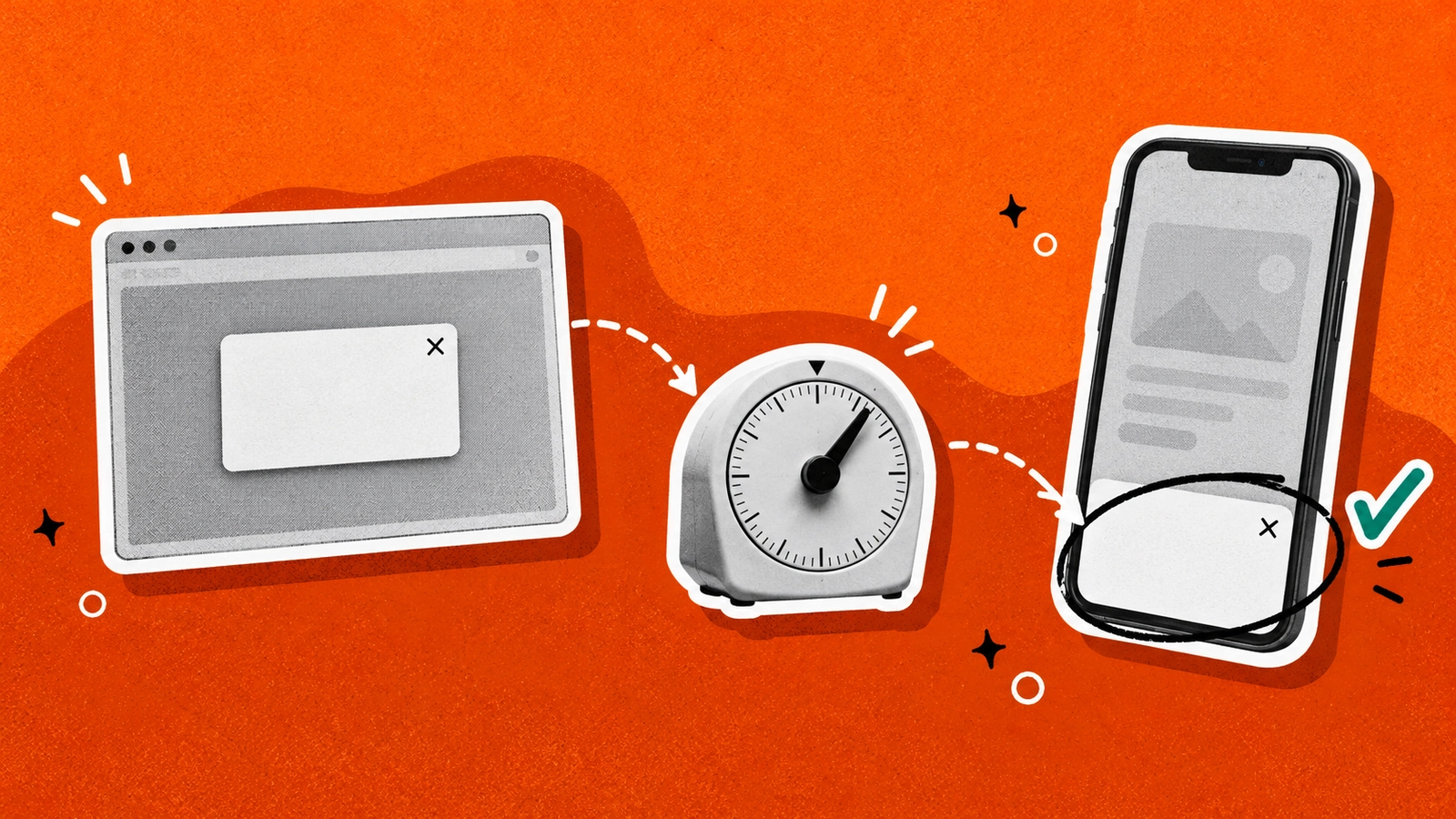
A Shopify popup is a message that opens over a store page after a trigger such as a time delay, a scroll, an exit movement, or a click. In practice, merchants use popups to collect email addresses, announce a discount, confirm a shopper’s age, or promote a sale.
A badly timed popup interrupts the shopper, and a full-screen one on mobile can run into Google’s guidance on intrusive interstitials. One that collects emails without clear consent can also break privacy law. They work when each popup serves a single goal, appears at the right moment, and is easy to close.
In this guide, you’ll learn which popup types exist, how to add one to your Shopify store, when to trigger it, how to design it for desktop and mobile, which privacy rules apply, how popups affect page speed, and how to measure results.
- A popup interrupts and a banner stays put. Use a popup for the one action you most want, and a banner for ongoing news such as free shipping.
- Shopify Forms is free and covers email popups and inline forms, but its listing doesn’t mention countdown timers, announcement bars, or sales notifications (checked October 2026).
- Google treats full-page overlays as intrusive, while legally required prompts such as age gates are exempt and small banners are the suggested alternative.
- Consent has to be an active opt-in under the UK GDPR, and the FTC lists penalties of up to $53,088 for each email that breaks CAN-SPAM.
- Signups divided by views is the number to track, and comparing a popup with its own earlier version tells you more than any published benchmark.
What is a Shopify popup?
A popup is a window that opens over the page content. Banners and announcement bars, by contrast, sit in a fixed spot, usually above the header, and don’t ask for anything. Embedded forms live inside the page layout, for example in the footer, and slide-ins are smaller popups that enter from a corner of the screen.
Since a popup interrupts, it can earn more actions than a banner, at the price of more annoyance. That’s why you can run a banner for ongoing news such as free shipping and keep the popup for the one action you most want, such as an email signup.
Shopify covers part of this on its own. Some themes include an announcement bar section you can edit in the theme editor, so check yours before installing anything. If you want a popup, the free Shopify Forms app adds pop-up and inline forms that capture leads and apply discounts.
Which popup type fits your goal?
Choose the type by the goal before you look at templates. The table below lists each common format with its job, its usual trigger, and the mistake that most often goes with it.
| Type | Best for | Usual trigger | Watch out for |
|---|---|---|---|
| Email signup | Growing your list, often with a first-order discount | Time on page or scroll depth | Discounting people who would have bought anyway |
| Minimum-purchase or free-shipping offer | Lifting order value at a cart threshold | Add to cart or cart page | Setting a threshold below what your margin allows |
| Exit intent | Recovering a visitor who is about to leave | Cursor leaving the window | Mobile has no cursor, so the trigger differs by device |
| Spin to win or quiz | Gamified signups and preference questions | Time delay or click | The extra step can cost more signups than the game adds |
| Survey | Learning why shoppers hesitate | Exit or after purchase | Long questionnaires that shoppers abandon |
| SMS signup | Collecting phone numbers | Second step after an email signup | Needs its own consent wording |
| Announcement bar | Free shipping thresholds, sale dates, store news | Always visible | Stale messages left up after the offer ends |
| Countdown banner | A sale with a real end date | Always visible until the deadline | A fake or resetting timer that erodes trust |
| Sales or social-proof popup | Showing recent purchases | Rotating during the visit | Notifications for sales that didn’t happen |
| Age verification | Products with a legal age limit | First page load | It’s a legal gate, so never reuse it as a marketing prompt |
| Upsell or cross-sell | Adding products at the cart | Add to cart | Offering items unrelated to what is in the cart |

Discount popups come in a few shapes, and our email popup examples show how stores word them. The common version takes a percentage off the first order. A minimum-purchase offer rewards shoppers who reach a cart threshold and can lift order value.
A free-shipping offer addresses delivery cost at the moment the shopper sees it, and a referral offer rewards existing customers who bring a friend.
It helps to test the size of the discount instead of copying a number from another store. That’s because a 10% offer only pays off if the people who claim it wouldn’t have bought at full price. Spin to win only makes sense if your store gets enough traffic to tell whether the extra step costs you signups.
How to add a popup to Shopify
You can add a popup to your Shopify store in three ways: with the free Shopify Forms app, with a third-party popup app, or with custom code in your theme.
Option 1. Use Shopify Forms
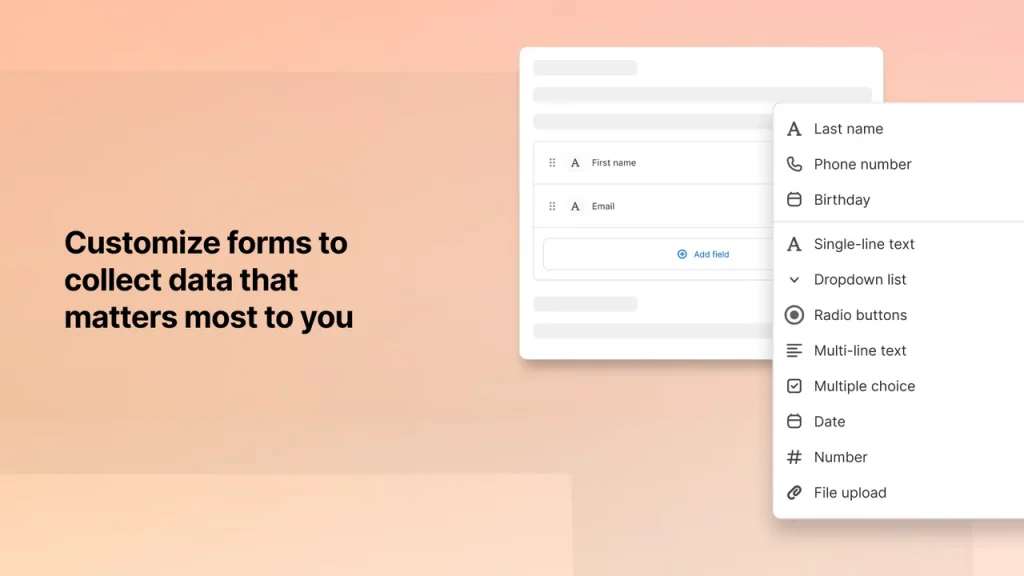
Shopify Forms is a free Shopify app that creates pop-up and inline forms and can offer a discount to encourage signups. Its listing doesn’t mention countdown timers, announcement bars, or sales notifications. For those, you’ll need another tool. If an email popup is all you need, start here.
The same listing describes forms with discounts and triggers, and it lists exit intent among its campaign types (checked October 2026). That covers an email popup with a first-order offer. You can test the basics before you pay for anything.
Option 2. Use a popup app
A popup app adds formats that the Shopify Forms listing doesn’t mention, such as countdown timers, announcement bars, and sales notifications. After you install one, you usually have to enable its app embed: go to Online Store > Themes > Customize, open the App embeds icon, switch the embed on, and save. Until that step is done, the popup never shows on your storefront.
The exact steps differ by app. Our step-by-step guide to adding a pop up on Shopify covers the seven steps from installing an app to activating the campaign.
To compare specific popup apps on price and free plans, see our best Shopify popup apps comparison. For banner and announcement-bar tools, see our roundup of Shopify banner apps.

Option 3. Add custom code
Custom code means writing a snippet and including it in theme.liquid. That gives you full control over how the popup looks and behaves.
That control puts maintenance on you: a theme update can overwrite the snippet, and consent, frequency caps, and accessibility all become your job. Unless you work with a developer, Shopify Forms or an app is the safer choice.
After you pick a tool: five decisions
Pick one goal per popup: either join the list, claim a code, or read an announcement. A popup that aims at several goals splits the shopper’s attention between them.
Choose the trigger next; the section below covers your options. Then write the offer: lead with what the shopper gets, state the amount and the condition, such as 10% off a first order, and ask for one email address.
Set the rules after that. You can limit the popup to the pages where it fits, cap how often one visitor sees it, and exclude people who already subscribed. The cap matters because without it the same popup reappears on every page view.
The last decision is the mobile check: open the live store on a phone, trigger the popup yourself, and confirm the close button is visible and the page still scrolls once it closes.
When to trigger a popup
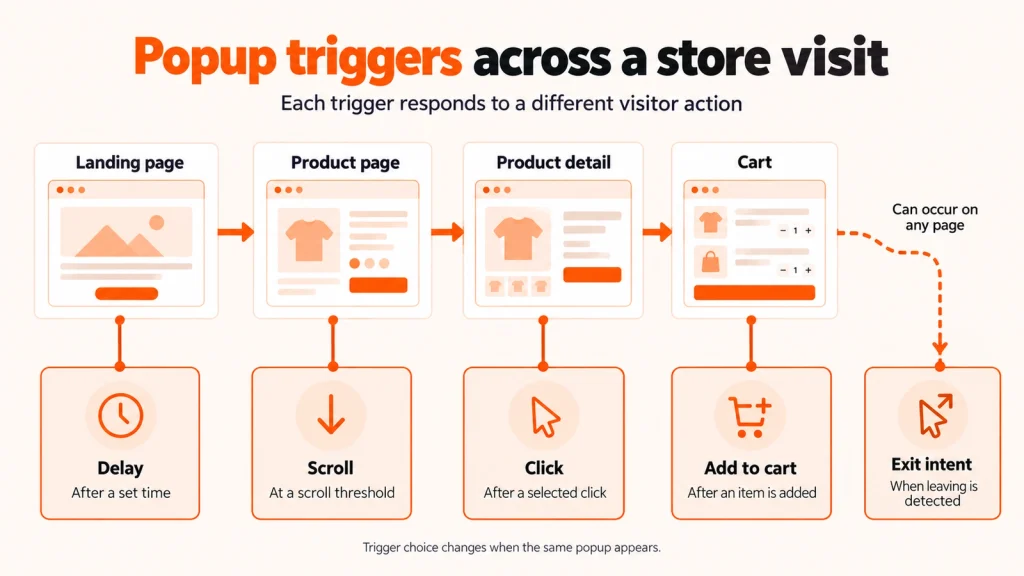
Whether a popup feels helpful or intrusive depends mostly on when it appears. You can choose from five triggers: a time delay, scroll depth, exit intent, a click, or a cart action.
- A time delay shows the popup after a set number of seconds. It’s the simplest trigger and the easiest to misuse, because a popup that opens before the shopper has seen a product asks for commitment too early.
- Scroll depth waits until the visitor has read part of the page, which signals interest and lets the product appear before the popup does.
- Exit intent fires when the cursor heads for the browser bar or tab. It targets people already leaving, so a discount here costs less than the same discount offered to everyone on arrival. Mobile has no cursor, so check what your app uses instead before you rely on it. Our exit-intent popup guide covers setup and examples.
- A click trigger opens the popup only when the shopper presses a button, so it never interrupts. That makes it a good fit for a size guide, a quote request, or a signup link in the header.
- Cart triggers fire when the shopper adds a product or opens the cart, which is where upsell offers belong.
No timing rule fits every store. You’ll want to treat your first setting as a starting guess and compare signup rates across triggers after a couple of weeks.
Popup design and copy
A good popup has a headline that states the offer, one line of support, a single field, and a button that says what happens next. Wording matters most on the headline and the button. “Get 10% off your first order” tells the shopper more than “Subscribe”, and “Send my code” beats “Submit” for the same reason.
As for the form itself, you only need the email address. The popup is a first step, and you can collect more later.
A visible close button or a plain “No thanks” link gives the shopper an obvious way out and keeps the popup from feeling like a trap. On a phone, a generous touch target helps too. WCAG 2.2 sets 24 by 24 CSS pixels as the minimum target size at level AA.
A popup that opens over the page has to work without a mouse, too. WCAG requires every function to be operable from a keyboard and focus never to be trapped. That way, shoppers can tab to the close button and leave the popup with the keyboard.
In addition, text needs a contrast ratio of at least 4.5:1 against its background, which matters most on image-heavy offers.
Match the popup to the store by using the brand’s colors and type, since a stock template looks like an ad. For banner layouts, see our guide to ecommerce banner design best practices.
Further readingPopup Design Best Practices: How to Boost Conversions Without Annoying Your VisitorsA longer treatment of popup layout, copy, and testing.Popups on mobile and Google’s interstitial rule
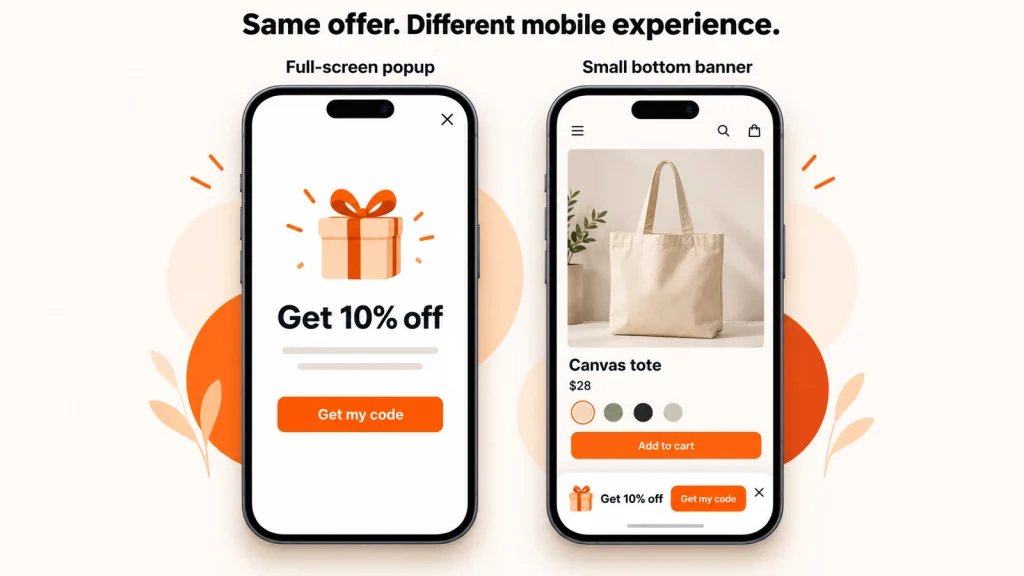
Google describes intrusive interstitials and dialogs as elements that block the user’s view of content, usually for promotional purposes. Interstitials cover the whole page, dialogs cover part of it, and Google says interstitials can frustrate users, and that both can make content harder for search engines to understand.
Google recommends banners instead of full-page interstitials and says a banner should take up only a small fraction of the screen. It also lists covering the entire page with an overlay as a common mistake.
Interstitials a site is legally required to show, such as an age gate, are exempt. For those, Google suggests overlaying the content instead of sending shoppers to a separate page. You can read the full text in Google Search Central.
On a phone, that means a popup that covers part of the screen with the close button within thumb reach. A banner at the top or bottom that leaves the product visible works too.
It’s safer to hold the popup until a scroll trigger fires. That gives the shopper time to see the product first. Then test the form on a real phone, because the on-screen keyboard can cover the field or the submit button.
Seasonal and promotional popups
Popups matter most around a sale, when a banner announces the offer and a popup captures the shoppers who arrive because of it. A seasonal campaign needs a start date, an end date, and one message per banner or popup.
Schedule every banner and popup to start and end with the campaign, in your store’s time zone, and replace it the day the offer ends. Black Friday and Cyber Monday compress this work into a few days, so build and test the popups a week ahead. For the sale itself, use our Black Friday ecommerce ideas.
A countdown tied to a true end date works as a reminder. If the timer resets for each visitor, it’s a fabricated deadline, and shoppers who spot one may stop trusting the store’s other offers. Our guide to countdown timer types shows which formats suit which kind of sale.
Upsell and cross-sell popups
An upsell popup offers a higher-priced or upgraded version of what the shopper is considering, and a cross-sell popup suggests a complementary product, such as a case with a phone. On Shopify, both usually run from an add-to-cart or cart-page trigger, because that’s the moment the shopper has already chosen something.
Keep the offer relevant to the item in the cart and easy to decline, since an unrelated suggestion interrupts the purchase the popup is meant to grow.
A post-purchase upsell appears after payment, which keeps it from delaying checkout. General popup apps can show a simple cart offer. Dedicated upsell apps are built for product matching and checkout placement, and our best upsell apps for Shopify compares them.
Consent and privacy
A signup popup collects personal data, so it needs consent that holds up under the law of the shopper’s country. The UK regulator’s guidance on valid consent lists what counts: an active opt-in, kept separate from other terms, specific about what the shopper agrees to, named to your organisation, and as easy to withdraw as to give. Pre-ticked boxes don’t count, and the wording comes from Article 4(11) of the GDPR.
In the US, the FTC’s CAN-SPAM compliance guide says the law covers every commercial email, including promotional email to consumers. Each message needs accurate sender details, a clear advertisement label, a valid postal address, and a working opt-out that you honor within 10 business days. The FTC also lists penalties of up to $53,088 for each violating email.
In practice, your popup should name what the shopper is signing up for, link to your privacy policy, and collect a phone number with separate, clearly worded consent when you offer SMS. This section is general information, so if you sell in several countries, have a lawyer review your signup flow.
Popups and page speed
Every popup app loads code on your storefront, so it affects speed. Shopify’s Built for Shopify requirements say an app must not reduce the storefront Lighthouse performance score by more than ten points. That limit applies to apps seeking the badge, so for any app you install, run your own before-and-after test.
Open the same product page in PageSpeed Insights with the app embed on, repeat the test a few times, and compare the performance scores. Then turn the embed off under Online Store > Themes > Customize > App embeds and test again to see how much of any drop comes from the popup. Running one popup app instead of several keeps the number of scripts down.
How to measure and test popups
A popup’s conversion rate is the number of signups or clicks divided by the number of times it was shown. If a popup is viewed 2,000 times and collects 60 emails, its rate is 3%. Your own rate will depend on traffic source and offer.
Track cost and subscriber quality alongside conversion rate, where quality means how many of the people who claimed your first-order discount open your emails or buy later.
Published popup conversion lifts vary widely between guides. You’ll learn more by comparing your popup against its own previous version than against a benchmark.
Test one variable at a time, such as the headline or the trigger, so the result points to a cause. Run each version until it has collected enough signups to compare.
Common popup mistakes
The five mistakes below are easy to check on your own store.
The shopper hasn’t seen anything worth subscribing for yet, so hold the popup until a scroll or an exit signal.
A signup box, a sale banner, and a chat bubble compete for the same space and leave the shopper closing three things. That’s why it’s safer to run one overlay at a time.
A desktop-sized popup can cover a phone screen with the close button off-screen.
A countdown that has hit zero or a banner for a sale that ended last week undermines trust in the offers that are still valid.
A pre-ticked box or a missing privacy link doesn’t meet the consent rules above and can expose you to penalties.
Final thoughts
A popup works when it has one goal, appears at the right moment, and is easy to close. That means picking the one action you most want from a visitor, using the quietest format that can get it, and measuring signups divided by views before you add a second popup. Shopify Forms covers a simple email popup for free, and an app makes sense when you need countdowns, scheduling, or sales notifications.
Frequently asked questions
Does Shopify have a free popup feature?
Yes. Shopify Forms is a free Shopify app that creates pop-up and inline forms and can offer a discount to encourage signups. Its listing doesn’t mention countdown timers, announcement bars, or sales notifications.
What is the difference between a popup and an announcement bar?
A popup opens over the page after a trigger and usually asks the visitor to act. An announcement bar sits in a fixed place, typically above the header, and shares news such as free shipping or a sale date without asking for anything.
Do popups hurt SEO?
Google treats intrusive interstitials, elements that block the view of content for promotional purposes, as a problem and advises against covering the entire page. Small banners are the suggested alternative, and legally required prompts such as age gates are exempt.
When should a popup appear on a Shopify store?
A popup should appear after the shopper has had time to see the page. A scroll trigger or an exit signal usually works better than a popup on page load. You can then run your first trigger setting for a couple of weeks and compare signup rates.
Is an email popup GDPR compliant?
It can be when consent is an active opt-in, kept separate from other terms, specific about the purpose, and easy to withdraw. Pre-ticked boxes don’t count as consent under the UK regulator’s guidance.
Do popup apps slow down my Shopify store?
Yes, they can, because every popup app adds code to your storefront. Shopify’s Built for Shopify requirements cap the loss at ten Lighthouse points for apps seeking the badge. To check your own store, test a page in PageSpeed Insights with the app embed on and off.


